Sunday, June 23, 2019

Reactive web application with SpringBoot

0. Intro

Event-driven asynchronous approach is getting more and more popular.
When we're talking about REACTIVE we means that we should react somehow on something. When it comes to web applications, most often that means: we should react by showing some new information on the page on some event,

With traditional approach web page should poll(send request, receive response) some rest service every time it want to get new portion of data:


With reactive - we don't have to poll, we just have to subscribe to some "event stream".


1. SpringBoot reactive web application

Let's now create "reactive" springBoot application.

build.gradle:

plugins {
 id 'org.springframework.boot' version '2.1.5.RELEASE'
 id 'java'
}

apply plugin: 'io.spring.dependency-management'

group = 'com.demien'
version = '0.0.1-SNAPSHOT'
sourceCompatibility = '1.8'

configurations {
 developmentOnly
 runtimeClasspath {
  extendsFrom developmentOnly
 }
}

repositories {
 mavenCentral()
}

dependencies {
 implementation 'org.springframework.boot:spring-boot-starter-webflux'
 developmentOnly 'org.springframework.boot:spring-boot-devtools'
 testImplementation 'org.springframework.boot:spring-boot-starter-test'
 testImplementation 'io.projectreactor:reactor-test'
}

- we have to add dependency "webflux" here.


Main application runner: 

package com.demien.reactweb;

import org.springframework.boot.SpringApplication;
import org.springframework.boot.autoconfigure.SpringBootApplication;

@SpringBootApplication
public class ReactwebApplication {

 public static void main(String[] args) {
  SpringApplication.run(ReactwebApplication.class, args);
 }

}


- nothing interesting is here, just start of spring boot application.

Reactive rest controller: 

package com.demien.reactweb;

import java.time.Duration;

import org.apache.commons.logging.Log;
import org.apache.commons.logging.LogFactory;
import org.springframework.web.bind.annotation.RequestMapping;
import org.springframework.web.bind.annotation.RestController;

import reactor.core.publisher.Flux;

@RestController
public class RandomNumberController {

 private final Log log = LogFactory.getLog(RandomNumberController.class);

 @RequestMapping("/random")
 public Flux<Integer> random() {
  return Flux.interval(Duration.ofSeconds(5)).map(i -> {
   this.log.info("iteration:" + i);
   return generateRandomNumber();
  }).log();
 }

 private int generateRandomNumber() {
  return (int) (Math.random() * 1000);
 }

}

-magic is happening here ! First of all, we're returning Flux<Integer> - that means, we're actually returning "stream" of integers. Second - we're using delay of 5 seconds between emitting elements.

2. HTML Web page

Here we have just one button. But than we're pressing it, it subscribes as to events which are coming from rest endpoint "/random" which we created at previous step. Also we're defining the "handler" (stringEventSource.onmessage) - what should we do when new event arrives: we're just adding one more list item.


<html>

<head>

    <script>
        function registerEventSourceAndAddResponseTo(uri, elementId) {
            var stringEvents = document.getElementById(elementId);
            var stringEventSource = new EventSource(uri);
            stringEventSource.onmessage = function (e) {
                var newElement = document.createElement("li");
                newElement.innerHTML = e.data;
                stringEvents.appendChild(newElement);
            }
        }

        function subscribe() {
            registerEventSourceAndAddResponseTo("http://localhost:8080/random","display");
        }

    </script>

</head>

<body>

    <p>
        <button id="subscribe-button" onclick="subscribe()">Subscribe to random numbers</button>
        <ul id="display"></ul>
    </p>


</body>

</html>

3. Let's run it! 

I'm running my springBoot application and opening the web page:


Nothing happen so far. We have to press the button for being subscribed to new event. Let's press it:


And now it's much better! Events are coming from server side and UI shows them!

4. The end. 

Full source code can be downloaded from here.

Wednesday, June 12, 2019

Microservices with Spring Boot 2

0. Intro

This is some kind of refreshment of one of my previous posts: "Microservices with spring boot"
updates:
- codebase migrated to version of spring boot: 2.1.4
- used"feign client" instead of "rest template" for micro-services interaction
- used "zipkin" and "sleuth.sampler" for application monitoring

I will not be providing a lot of details - they are in my previous post. DRY - don't repeat yourself :)

1. Architecture

Actually, architecture is the same as in previous post. Client is communicating with 3 micro-services:


But apart from them, we also have some "infrastructure micro-services":


Next picture is taken from zipkin - to show micro-services communication flow: we're calling edge-server and providing it with details of server we actually want to call. Below, we're calling from edge-server - cart-service(method cart/test), which calling through edge-server  user-service  2 times (user/login and user/byToken)  and again through edge-server -  item-service (item/getAll):


2. Discovery server 

The same stuff as in my previous post - I'm using Eureka:


3. Micro-services interaction

As I mentioned at the beginning, I'm using "feign client" for micro-services interaction. I'll show it on example of "cart-service" - it should call "user-service" to get user details and also it should get some items details from "item-service".

3.1. Properties

file application.properties:

spring.application.name=cart-service
server.port=8100
eureka.client.serviceUrl.defaultZone=http://localhost:8761/eureka

- here we're defining "coordinates" of our discovery service to get information about services we may need (user and item services)

file bootstrap.properties:

spring.zipkin.base-url=http://localhost:9411/
spring.sleuth.sampler.probability=1

- here we're defining "coordinates" of zipkin application - we 'll be sending there requests traces.

3.2 Feign clients 

In feign clients we're defining our "edge-server". Also we're defining "ribbon-client" for service we want to call - it can be different instances of one service, so ribbon client needed for load-balancing. And finally in methods, we're defining the exact rest-services we want to call.

Item service feign client: 

package com.demien.sprcloud.cartservice.controller;
import java.util.List;

import org.springframework.cloud.netflix.ribbon.RibbonClient;
import org.springframework.cloud.openfeign.FeignClient;
import org.springframework.web.bind.annotation.PathVariable;
import org.springframework.web.bind.annotation.RequestMapping;
import org.springframework.web.bind.annotation.RequestMethod;

import com.demien.sprcloud.cartservice.domain.Item;

@FeignClient(contextId = "itemClient", name = "edge-server")
@RibbonClient(name = "item-service")
public interface ItemServiceProxy {

 @RequestMapping(value = "/item-service/item/{itemId}", method = RequestMethod.GET)
 public Item getById(@PathVariable("itemId") String itemId);

 @RequestMapping(value = "/item-service/item/getAll", method = RequestMethod.GET)
 public List<Item> getAll();

}


User service feign client: 

package com.demien.sprcloud.cartservice.controller;

import org.springframework.cloud.netflix.ribbon.RibbonClient;
import org.springframework.cloud.openfeign.FeignClient;
import org.springframework.web.bind.annotation.PathVariable;
import org.springframework.web.bind.annotation.RequestMapping;
import org.springframework.web.bind.annotation.RequestMethod;
import org.springframework.web.bind.annotation.RequestParam;

@FeignClient(contextId = "userClient", name = "edge-server")
@RibbonClient(name = "user-service")
public interface UserServiceProxy {

 @RequestMapping(value = "/user-service/user/login", method = RequestMethod.POST)
 public String login(@RequestParam("userId") String userId, @RequestParam("userPassword") String userPassword);

 @RequestMapping(value = "/user-service/user/byToken/{tokenId}", method = RequestMethod.GET)
 public String userByToken(@PathVariable("tokenId") String tokenId);

}

3.3. Test method with interaction 

Next method is just for emulation of some process where user is logging in, adding some items into cart: our cart-service will be communicating with item and user services. Now we can "autowire" our feign clients - and just call them! Lines with calls - are in bold.

 @Autowired
 private UserServiceProxy userServiceProxy;

 @Autowired
 private ItemServiceProxy itemServiceProxy;

 public String getDefaultResponse() {
  return "Something is wrong. Please try again later";

 }

 @HystrixCommand(fallbackMethod = "getDefaultResponse")
 @RequestMapping(method = RequestMethod.GET, value = "/test")
 public String test() {
  final StringBuilder result = new StringBuilder();
  result.append("Logging in into userService as user1/pasword <br/> ");
  final String tokenId = this.userServiceProxy.login("user1", "password1");
  result.append("Received Token: " + tokenId + "<br/><br/>");
  result.append("Getting user details from userService by token <br/>");
  final String userDetails = this.userServiceProxy.userByToken(tokenId);
  result.append("Reseived UserDetails: " + userDetails + "<br/><br/>");

  result.append("Getting item list from itmService <br/>");
  final List<Item> items = this.itemServiceProxy.getAll();
  result.append("Reseived items: <br/>");
  items.forEach(item -> result.append("    " + item.toString() + " <br/>"));

  return result.toString();
 }

Now to test it we can open in browser URL: http://localhost:8765/cart-service/cart/test
and result should be:


Logging in into userService as user1/pasword 
Received Token: ec1a5d78-a8c5-4392-90bb-cbca7d8c9244

Getting user details from userService by token
Reseived UserDetails: {"id":"user1","name":"First User","address":"First Address"}

Getting item list from itmService
Reseived items:
Item(itemId=I6S, itemName=IphoNovatekne 6s, price=400.00)
Item(itemId=I7, itemName=Iphone 7, price=500.00)
Item(itemId=N5, itemName=Samsung galaxy note 5, price=450.00) 


- so we successfully called 2 micro-services!


4. Zipkin 

Zipkin lives here. It's a distributing trace system. To use it I just downloaded JAR file and started it by "java -jar zipkinFileName.jar"

My micro-services are already configured for using trace information to zipkin (bootstrap.propeties at #3.1). So when zipking is started it's possible to monitor them:


Now we can drill-down to details and found the picture I shown at the beginning:
I think this picture makes much more sense now - it's a "map" of execution of my test rest service from #3.3.


5. The end. 

As I mentioned at the beginning, a lot of details were omitted, because they are present in my previous post. Full source code can be downloaded from here.

Friday, April 26, 2019

Java memory dump analysis (memory leaks detection)

0. Intro

In his post I'm going to show the monitoring of application using VisualVM and memory dump analysis using Eclipse Memory Analyzer.

1. What is "memory leak"?

When the garbage collector is trying to "clean garbage" it's looking objects in heap which are unreachable (no references to this object) and removing them. So, if for some reason we're creating new object and always keeping references to them - such objects will not be removed from heap by garbage collector, and application will be using more and more memory till OutOfMemory error.

- such types of problems called "memory leaks".

2. Memory leak example application

Let's now create a simple application with memory leak: we will be creating new objects and storing the references to them into list. So, the objects will not be available for garbage collecting(the will be referenced by list elements).

package com.demien.memanaly;
import java.util.ArrayList;import java.util.List;import java.util.UUID;
public class AppMain {

   class User {
      private String name;
      public User(String name) {
         this.name = name;      }

      public String getName() {
         return name;      }
   }

   private List<User> users = new ArrayList<>();
   public void run() throws InterruptedException {
      while (true) {
         users.add(new User(UUID.randomUUID().toString()));         Thread.sleep(5);      }
   }

   public static void main(String[] args) throws InterruptedException {
      System.out.println("Rinning");      new AppMain().run();
   }

}


To make everything more obvious, let's decrease available memory to 10Mb size by VM argumet -Xmx10m:


3. Run and monitor

To understand what is memory leak, we have to remind ourselves how Garbage collector works: it's trying to remove from heap "unused" objects (which are unreachable). When we created the object, used it for some time and stopped used it - it will be removed from heap by garbage collector. But in our case we don't have "unused"(unreachable) objects, because we're keeping links to all our objects in list. So there are no object for GC to collect, and occupied space in heap will be continuously increasing. 

For monitoring heap usage we can use visualVM tool. It can be downloaded from here.
After running, you have to install from Tools/Plugins/Available Plugins : Visual GC. After installation and running application we have to select it on the left side of the screen,  and open connection:


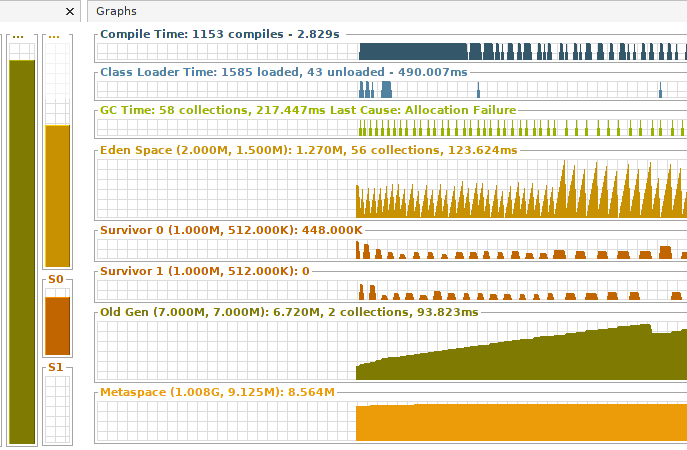
next - just switch into tab "Visual GC" from just installed plugin. It will be showing current state of all heap areas. We're interested at "Old Gen" area: as you can see, it's constantly growing. That means: GC can not remove from heap object's we're creating - something is definitely wrong with our application:


4. Memory analyzing tool(MAT)

At previous step we found that we have memory leak. Now, let's found which objects are being "mistakenly" created in heap. Of course we know that the problem is with "User" class which we're creating, but let's pretend what we don't know that :)

To analyze memory usage I used eclipse memory analyzer tool(MAT), it can be downloaded from here.
We have 2 options:
 - create dump using visualVM("Monitor" tab + "Head Dump" button)
 - connect  MAT directly to our process

I used second option:


After selecting my java process and pressing "Finish" - I selected "memory leaks" on next screen. And MAT showed me the result:
Size: 2.6 MB Classes: 499 Objects: 56.4k Class Loader: 3 Unreachable Objects Histogram


After clicking on largest (blue) area we can open list of objects with outgoing references: after several "drill-downs" we will be able to see next picture:


Of course, it's not a surprise for us: we have a very big ArrayList with objects of type User - that's our main problem.  We have to stop keeping references to new new objects in arrayList and we'll be fine.

5. The end 

Memo leaks are bad! :) The all heap space will be occupied we will have "out of memory error". So we have to try to avoid situations like described above.

Tuesday, March 26, 2019

Spring Boot Data JPA (with REST)

0. Intro 

It's getting more and more easier to create rest services with spring boot : now It's possible to create them with just several annotations! Let's see :)

1. Project structure

I created simple gradle project with some tests:


2.  Dependencies (build.gradle)

We need:
- spring-data-jpa   - to use auto-generated by Spring repositories
- sparing-data-rest - to expose these repositories by REST services
- lombok - to reduce code for entities classes
- h2 - as database

plugins {
   id 'org.springframework.boot' version '2.1.3.RELEASE'   id 'java'}

apply plugin: 'io.spring.dependency-management'
group = 'com.demien'version = '0.0.1-SNAPSHOT'sourceCompatibility = '1.8'
repositories {
   mavenCentral()
}

dependencies {
   implementation 'org.springframework.boot:spring-boot-starter-data-jpa'   implementation 'org.springframework.boot:spring-boot-starter-data-rest'   runtimeOnly 'com.h2database:h2'   compileOnly('org.projectlombok:lombok')
   testImplementation 'org.springframework.boot:spring-boot-starter-test'}


3. Main runner class 

Nothing interesting is here - just spring boot runner:

package com.demien.sprdata;
import org.springframework.boot.SpringApplication;import org.springframework.boot.autoconfigure.SpringBootApplication;
@SpringBootApplicationpublic class SprdataApplication {

   public static void main(String[] args) {
      final SpringApplication app = new SpringApplication(SprdataApplication.class);      app.run(args);   }

}


4. Domain entities 

I create only 2 entities: "parent" : UserGroup and "child": User.

4.1. UserGroup entity 

Thanks to lombok, it's very simple, we just have to list properties. Also we have to annotate it as "@Entity" and also I'm defining named query "UserGroup.namedQueryByName"| :

package com.demien.sprdata.domain;
import javax.persistence.Entity;import javax.persistence.GeneratedValue;import javax.persistence.GenerationType;import javax.persistence.Id;import javax.persistence.NamedQuery;
import lombok.Getter;import lombok.Setter;
@Entity@Getter@Setterpublic class UserGroup {

   @Id   @GeneratedValue(strategy = GenerationType.AUTO)
   private Long id;   private String name;   private String description;
   public UserGroup() {

   }

}


4.2. User entity

It's little bit more complicated: we have to define relationship with parent: we will be joining by field groupId. And I'm also defining named query.

package com.demien.sprdata.domain;
import javax.persistence.Entity;import javax.persistence.FetchType;import javax.persistence.GeneratedValue;import javax.persistence.GenerationType;import javax.persistence.Id;import javax.persistence.JoinColumn;import javax.persistence.ManyToOne;import javax.persistence.NamedQuery;
import lombok.Getter;import lombok.Setter;
@Getter@Setter@Entity@NamedQuery(name = "User.namedQueryByName", query = "SELECT u FROM User u WHERE u.name = :name ")
public class User {

   @Id   @GeneratedValue(strategy = GenerationType.AUTO)
   private Long id;   @ManyToOne(fetch = FetchType.LAZY)
   @JoinColumn(name = "groupId")
   private UserGroup group;   private String name;   private Integer salary;
   public User() {
   }

}


5. Repositories

The magic is happening here. We just have to define interface ..... and that's it! We don't have to create the implementation - it will be created by Spring!!!

5.1. UserGroup repository 

I made it very simple: we're just extending CrudRepository and adding several methods.
"Crud" means Create, Update and Delete - so all these methods will be available in implementation which will be generated by Spring. And also 2 more methods added: findAll and count;

package com.demien.sprdata.repository;
import org.springframework.data.repository.CrudRepository;
import com.demien.sprdata.domain.UserGroup;
public interface UserGroupRepository extends CrudRepository<UserGroup, Long> {

   Iterable<UserGroup> findAll();
   long count();
}


5.2. UserRepository 

It's more complicated. First of all, we're annotation it with @RepositoryRestResource to expose methods as rest services.  Next - I'm using PagingAndSorting repository, so paging and sorting features will be available. Also I'm adding a lot of methods which will be generated by Spring:
- we can use patter [find | count] By [fieldName].
- we can even use fields of parent entity (UserGroup which is accessed by "group" field in User entity)
- we can define our own queries


package com.demien.sprdata.repository;
import java.util.List;
import org.springframework.data.jpa.repository.Query;import org.springframework.data.repository.PagingAndSortingRepository;import org.springframework.data.repository.query.Param;import org.springframework.data.rest.core.annotation.RepositoryRestResource;
import com.demien.sprdata.domain.User;
//http://localhost:8080/users/@RepositoryRestResource(collectionResourceRel = "users", path = "users")
public interface UserRepository extends PagingAndSortingRepository<User, Long> {
   Iterable<User> findAll();
   long count();
   List<User> findByName(String name);
   Long deleteByName(String name);
   Long countByGroupName(String groupName);
   // find by parent entity : Group   List<User> findByGroupName(String name);
   // defining custom query   @Query("SELECT u FROM User u WHERE u.name LIKE CONCAT('%', :name, '%') ")
   List<User> queryByName(@Param("name") String name);
   // using named query defined in entity class   List<User> namedQueryByName(@Param("name") String name);
   @Query(value = "SELECT * FROM User WHERE name = :name ", nativeQuery = true)
   List<User> nativeQueryByName(@Param("name") String name);
}

6. Testing 

And now let's test how this magic works

6.1 UserGroupRepository -  test

Here I'm testing just CRUD operations:


package com.demien.sprdata;
import static org.junit.Assert.assertEquals;import static org.junit.Assert.assertFalse;import static org.junit.Assert.assertTrue;
import java.util.ArrayList;import java.util.List;import java.util.Optional;
import org.junit.Test;import org.junit.runner.RunWith;import org.springframework.beans.factory.annotation.Autowired;import org.springframework.boot.test.autoconfigure.orm.jpa.DataJpaTest;import org.springframework.boot.test.autoconfigure.orm.jpa.TestEntityManager;import org.springframework.test.context.junit4.SpringRunner;
import com.demien.sprdata.domain.UserGroup;import com.demien.sprdata.repository.UserGroupRepository;
@DataJpaTest@RunWith(SpringRunner.class)
public class UserGroupRepositoryTest {

   @Autowired   private UserGroupRepository groupRepository;
   @Autowired   private TestEntityManager em;
   @Test   public void findAllTest() {
      final List<UserGroup> groups = new ArrayList<>();      groupRepository.findAll().forEach(group -> groups.add(group));      assertEquals(4, groups.size());   }

   @Test   public void checkUserGroupCount() {
      assertEquals(4, groupRepository.count());
   }

   @Test   public void findOne() {
      Optional<UserGroup> opGroup = groupRepository.findById(1001L);      assertTrue(opGroup.isPresent());      assertEquals("ADM", opGroup.get().getName());
      groupRepository.deleteById(1001L);      opGroup = groupRepository.findById(1001L);      assertFalse(opGroup.isPresent());
   }

   @Test   public void createNewTest() {
      final UserGroup newGroup = new UserGroup();      newGroup.setDescription("Created");      groupRepository.save(newGroup);      assertTrue(newGroup.getId() != null);
      em.flush();      final Optional<UserGroup> loaded = groupRepository.findById(newGroup.getId());      assertTrue(loaded.isPresent());      assertTrue(loaded.get().getDescription().equals("Created"));
      groupRepository.deleteById(newGroup.getId());
   }

}


6.2. UserRepository - test

And most interesting is happening here: I'm testing paging, sorting, named queries, native queries....

package com.demien.sprdata;
import static org.junit.Assert.assertTrue;
import java.util.List;
import org.junit.Test;import org.junit.runner.RunWith;import org.springframework.beans.factory.annotation.Autowired;import org.springframework.boot.test.autoconfigure.orm.jpa.DataJpaTest;import org.springframework.boot.test.autoconfigure.orm.jpa.TestEntityManager;import org.springframework.data.domain.Page;import org.springframework.data.domain.PageRequest;import org.springframework.data.domain.Sort;import org.springframework.test.context.junit4.SpringRunner;
import com.demien.sprdata.domain.User;import com.demien.sprdata.repository.UserRepository;
@DataJpaTest@RunWith(SpringRunner.class)
public class UserRepositoryTest {

   @Autowired   UserRepository userRepository;
   @Autowired   TestEntityManager em;
   @Test   public void sortTest() {
      Sort sort = new Sort(Sort.Direction.ASC, "group_id").and(new Sort(Sort.Direction.DESC, "name"));      Iterable<User> users = userRepository.findAll(sort);      User first = users.iterator().next();      assertTrue(first.getGroup().getId() == 1001L);      assertTrue(first.getName().equals("Victor"));   }

   @Test   public void pagingTest() {
      final PageRequest pageRequest = PageRequest.of(0, 2);      final Page<User> userPage = userRepository.findAll(pageRequest);      assertTrue(userPage.getNumberOfElements() == 2);      assertTrue(userPage.getTotalPages() == 4);
   }

   @Test   public void findTest() {
      List<User> users = userRepository.findByName("Joe");      assertTrue(users.size() == 1);      assertTrue(users.get(0).getName().equals("Joe"));
      Long countByGroupName = userRepository.countByGroupName("ADM");      assertTrue(countByGroupName == 3L);
      users = userRepository.findByGroupName("ADM");      assertTrue(users.size() == 3);
      users = userRepository.queryByName("a");      assertTrue(users.size() == 5);      assertTrue(users.get(0).getName().contains("a"));
      users = userRepository.namedQueryByName("Charles");      assertTrue(users.size() == 1);      assertTrue(users.get(0).getId() == 104L);
      users = userRepository.nativeQueryByName("Mario");      assertTrue(users.size() == 1);      assertTrue(users.get(0).getId() == 105L);
   }

}


7. Rest services

And final thing: let's now run our application runner and open in browser: http://localhost:8080/users/

It should be something like :


{
  "_embedded" : {
    "users" : [ {
      "name" : "Joe",
      "salary" : 100,
      "_links" : {
        "self" : {
          "href" : "http://localhost:8080/users/101"
        },
        "user" : {
          "href" : "http://localhost:8080/users/101"
        },
        "group" : {
          "href" : "http://localhost:8080/users/101/group"
        }
      }
    }, {
      "name" : "Huan",
      "salary" : 200,
      "_links" : {
        "self" : {
          "href" : "http://localhost:8080/users/102"
        },
        "user" : {
          "href" : "http://localhost:8080/users/102"
        },
        "group" : {
          "href" : "http://localhost:8080/users/102/group"
        }
      }
    }, {
      "name" : "Michael",
      "salary" : 300,
      "_links" : {
        "self" : {
          "href" : "http://localhost:8080/users/103"
        },
        "user" : {
          "href" : "http://localhost:8080/users/103"
        },
        "group" : {
          "href" : "http://localhost:8080/users/103/group"
        }
      }
    }, {
      "name" : "Charles",
      "salary" : 100,
      "_links" : {
        "self" : {
          "href" : "http://localhost:8080/users/104"
        },
        "user" : {
          "href" : "http://localhost:8080/users/104"
        },
        "group" : {
          "href" : "http://localhost:8080/users/104/group"
        }
      }
    }, {
      "name" : "Mario",
      "salary" : 200,
      "_links" : {
        "self" : {
          "href" : "http://localhost:8080/users/105"
        },
        "user" : {
          "href" : "http://localhost:8080/users/105"
        },
        "group" : {
          "href" : "http://localhost:8080/users/105/group"
        }
      }
    }, {
      "name" : "Jan",
      "salary" : 300,
      "_links" : {
        "self" : {
          "href" : "http://localhost:8080/users/106"
        },
        "user" : {
          "href" : "http://localhost:8080/users/106"
        },
        "group" : {
          "href" : "http://localhost:8080/users/106/group"
        }
      }
    }, {
      "name" : "Victor",
      "salary" : 500,
      "_links" : {
        "self" : {
          "href" : "http://localhost:8080/users/107"
        },
        "user" : {
          "href" : "http://localhost:8080/users/107"
        },
        "group" : {
          "href" : "http://localhost:8080/users/107/group"
        }
      }
    } ]
  },
  "_links" : {
    "self" : {
      "href" : "http://localhost:8080/users{?page,size,sort}",
      "templated" : true
    },
    "profile" : {
      "href" : "http://localhost:8080/profile/users"
    },
    "search" : {
      "href" : "http://localhost:8080/users/search"
    }
  },
  "page" : {
    "size" : 20,
    "totalElements" : 7,
    "totalPages" : 1,
    "number" : 0
  }
}

- HATEOAS is in place  !

8. The end

As I mentioned at the beginning, with spring-boot stack we can create rest services with DB repositories by just adding few annotations! Full source code can be downloaded from here. 

Saturday, January 5, 2019

Spring MVC: unit and integration tests

1.Intro 

Spring MVC is the one of most popular framework for REST services in java. Let's see how can we test our Spring MVC rest serves.

2. Project structure

I created simple gradle spring boot project. It has beside main app starter  just one rest controller (UserController), two domain entities (Greeting, User) and test: unit and integration.


3. build.gradle

Beside spring-boot dependencies I just added Lombok to reduce some boilerplate code for domain objects. 

buildscript {
   ext {
      springBootVersion = '2.1.1.RELEASE'   }
   repositories {
      mavenCentral()
   }
   dependencies {
      classpath("org.springframework.boot:spring-boot-gradle-plugin:${springBootVersion}")
   }
}

apply plugin: 'java'apply plugin: 'eclipse'apply plugin: 'org.springframework.boot'apply plugin: 'io.spring.dependency-management'
group = 'com.demien'version = '0.0.1-SNAPSHOT'sourceCompatibility = 1.8
repositories {
   mavenCentral()
}


dependencies {
   implementation('org.springframework.boot:spring-boot-starter-web')
   compileOnly('org.projectlombok:lombok')
   testImplementation('org.springframework.boot:spring-boot-starter-test')
}

4. Main application starter

Nothing interesting is here. Just SpringApplication.run

package com.demien.sprmvc;
import org.springframework.boot.SpringApplication;import org.springframework.boot.autoconfigure.SpringBootApplication;
@SpringBootApplicationpublic class SprmvcApplication {

   public static void main(String[] args) {
      SpringApplication.run(SprmvcApplication.class, args);   }

}


5. Domain objects

Thanks to Lombok, my domain objects are really tiny!

 package com.demien.sprmvc.domain;

import java.util.Date;
import lombok.AllArgsConstructor;import lombok.Getter;import lombok.NoArgsConstructor;import lombok.Setter;
@Getter@Setter@NoArgsConstructor@AllArgsConstructorpublic class Greeting {
   private String message;   private Date dt;}


package com.demien.sprmvc.domain;
import lombok.AllArgsConstructor;import lombok.Getter;import lombok.NoArgsConstructor;import lombok.Setter;
@Getter@Setter@AllArgsConstructor@NoArgsConstructorpublic class User {
   private String name;}

6. Rest controller

Finally we've reached something interesting - the controller we are going to test.
I created several methods:  rest endpoints, from simple to complex:
 - "hello" - GET which is jest returning text result
 - "hello-with-object" - GET but it's returning java object. So object should be serialized and returned as JSON
- "hello-with-parameter" - GET which has a path paameter
- "helo-post" - POST which is receiving java object and returning java object as well. Of course these objects will be serialized to JSON. 


package com.demien.sprmvc.controller;
import java.net.URI;import java.util.Date;
import org.springframework.http.ResponseEntity;import org.springframework.stereotype.Controller;import org.springframework.web.bind.annotation.GetMapping;import org.springframework.web.bind.annotation.PathVariable;import org.springframework.web.bind.annotation.PostMapping;import org.springframework.web.bind.annotation.RequestBody;import org.springframework.web.bind.annotation.RequestMapping;import org.springframework.web.bind.annotation.ResponseBody;import org.springframework.web.servlet.support.ServletUriComponentsBuilder;
import com.demien.sprmvc.domain.Greeting;import com.demien.sprmvc.domain.User;
@Controllerpublic class UserController {

   private static final String helloWorldTemplate = "Hello World, %s!";   private int id = 1;
   @RequestMapping(value = "/hello")
   public @ResponseBody String hello() {
      return "Hello world!";   }

   @GetMapping("/hello-with-object")
   public @ResponseBody Greeting helloWithObject() {
      return new Greeting("Hello World", new Date());   }

   @GetMapping("/hello-with-parameter/name/{name}")
   public @ResponseBody Greeting helloWithParameter(@PathVariable String name) {
      return new Greeting(String.format(helloWorldTemplate, name), new Date());   }

   @PostMapping("/hello-post")
   public ResponseEntity<?> postTest(@RequestBody User user) {
      Greeting result = new Greeting(String.format(helloWorldTemplate, user.getName()), new Date());      URI location = ServletUriComponentsBuilder.fromCurrentRequest().path("/{id}").buildAndExpand(id++).toUri();      return ResponseEntity.created(location).body(result);   }

}


7. Unit test

And now let's check if our controller works as expected. For unit tests we're using MockMVC. And also we need ObjectMapper for JSON serialization.
Please pay attention on this  annotation:

@WebMvcTest(UserController.class)

- our mockMvc will be created for UserController class. 


package com.demien.sprmvc.controller;
import static org.hamcrest.Matchers.containsString;import static org.hamcrest.Matchers.equalTo;import static org.springframework.test.web.servlet.result.MockMvcResultMatchers.content;import static org.springframework.test.web.servlet.result.MockMvcResultMatchers.status;
import org.junit.Test;import org.junit.runner.RunWith;import org.springframework.beans.factory.annotation.Autowired;import org.springframework.boot.test.autoconfigure.web.servlet.WebMvcTest;import org.springframework.http.MediaType;import org.springframework.test.context.junit4.SpringRunner;import org.springframework.test.web.servlet.MockMvc;import org.springframework.test.web.servlet.request.MockMvcRequestBuilders;
import com.demien.sprmvc.domain.User;import com.fasterxml.jackson.databind.ObjectMapper;
@RunWith(SpringRunner.class)
@WebMvcTest(UserController.class)
public class UserControllerTest {

   @Autowired   private MockMvc mvc;
   @Autowired   private ObjectMapper mapper;
   @Test   public void helloTest() throws Exception {
      mvc.perform(MockMvcRequestBuilders.get("/hello").accept(MediaType.APPLICATION_JSON)).andExpect(status().isOk())
            .andExpect(content().string(equalTo("Hello world!")));   }

   @Test   public void helloWithObjectTest() throws Exception {
      mvc.perform(MockMvcRequestBuilders.get("/hello-with-object").accept(MediaType.APPLICATION_JSON))
            .andExpect(status().isOk()).andExpect(content().string(containsString("Hello World")));   }

   @Test   public void helloWithParameterTest() throws Exception {
      mvc.perform(MockMvcRequestBuilders.get("/hello-with-parameter/name/Buddy").accept(MediaType.APPLICATION_JSON))
            .andExpect(status().isOk()).andExpect(content().string(containsString("Hello World, Buddy")));   }

   @Test   public void postTest() throws Exception {
      User user = new User("Joe");      String userJson = mapper.writeValueAsString(user);      mvc.perform(
            MockMvcRequestBuilders.post("/hello-post").content(userJson).contentType(MediaType.APPLICATION_JSON))
            .andExpect(status().isCreated()).andExpect(content().string(containsString("Hello World, Joe")));   }

}


Results:


8. Integration test

For integration test we can not use any mocks - just real rest services. So we have to start our application
@SpringBootTest(classes = SprmvcApplication.class, webEnvironment = SpringBootTest.WebEnvironment.RANDOM_PORT)

and  test needed rest enpoints using TestRestTemplate.

package com.demien.sprmvc;
import static org.hamcrest.MatcherAssert.assertThat;import static org.hamcrest.Matchers.containsString;import static org.hamcrest.Matchers.equalTo;
import org.junit.Test;import org.junit.runner.RunWith;import org.springframework.boot.test.context.SpringBootTest;import org.springframework.boot.test.web.client.TestRestTemplate;import org.springframework.boot.web.server.LocalServerPort;import org.springframework.http.ResponseEntity;import org.springframework.test.context.junit4.SpringRunner;
import com.demien.sprmvc.domain.Greeting;import com.demien.sprmvc.domain.User;
@RunWith(SpringRunner.class)
@SpringBootTest(classes = SprmvcApplication.class, webEnvironment = SpringBootTest.WebEnvironment.RANDOM_PORT)

public class SprmvcApplicationIT {

   private static final String LOCAL_HOST = "http://localhost:";
   @LocalServerPort   private int port;   private TestRestTemplate template = new TestRestTemplate();
   @Test   public void helloTest() throws Exception {
      ResponseEntity<String> response = template.getForEntity(createURL("/hello"), String.class);      assertThat(response.getBody(), equalTo("Hello world!"));   }

   private String createURL(String uri) {
      return LOCAL_HOST + port + uri;   }

   @Test   public void helloWithObjectTest() throws Exception {
      ResponseEntity<String> response = template.getForEntity(createURL("/hello-with-object"), String.class);      assertThat(response.getBody(), containsString("Hello World"));   }

   @Test   public void helloWithParameterTest() throws Exception {
      ResponseEntity<String> response = template.getForEntity(createURL("/hello-with-parameter/name/Buddy"),            String.class);      assertThat(response.getBody(), containsString("Hello World, Buddy"));   }

   @Test   public void postTest() throws Exception {
      User userBean = new User("Joe");      ResponseEntity<Greeting> response = template.postForEntity(createURL("/hello-post"), userBean, Greeting.class);      Greeting result = response.getBody();      assertThat(result.getMessage(), containsString("Hello World, Joe"));   }

}


Results:


9. The end 

Unit and integration tests for out rest controller are in place, so we're good :)
Full source code can be downloaded from here.