Showing posts with label java. Show all posts

Friday, April 26, 2019

Java memory dump analysis (memory leaks detection)

0. Intro

In his post I'm going to show the monitoring of application using VisualVM and memory dump analysis using Eclipse Memory Analyzer.

1. What is "memory leak"?

When the garbage collector is trying to "clean garbage" it's looking objects in heap which are unreachable (no references to this object) and removing them. So, if for some reason we're creating new object and always keeping references to them - such objects will not be removed from heap by garbage collector, and application will be using more and more memory till OutOfMemory error.

- such types of problems called "memory leaks".

2. Memory leak example application

Let's now create a simple application with memory leak: we will be creating new objects and storing the references to them into list. So, the objects will not be available for garbage collecting(the will be referenced by list elements).

package com.demien.memanaly;
import java.util.ArrayList;import java.util.List;import java.util.UUID;
public class AppMain {

   class User {
      private String name;
      public User(String name) {
         this.name = name;      }

      public String getName() {
         return name;      }
   }

   private List<User> users = new ArrayList<>();
   public void run() throws InterruptedException {
      while (true) {
         users.add(new User(UUID.randomUUID().toString()));         Thread.sleep(5);      }
   }

   public static void main(String[] args) throws InterruptedException {
      System.out.println("Rinning");      new AppMain().run();
   }

}


To make everything more obvious, let's decrease available memory to 10Mb size by VM argumet -Xmx10m:


3. Run and monitor

To understand what is memory leak, we have to remind ourselves how Garbage collector works: it's trying to remove from heap "unused" objects (which are unreachable). When we created the object, used it for some time and stopped used it - it will be removed from heap by garbage collector. But in our case we don't have "unused"(unreachable) objects, because we're keeping links to all our objects in list. So there are no object for GC to collect, and occupied space in heap will be continuously increasing. 

For monitoring heap usage we can use visualVM tool. It can be downloaded from here.
After running, you have to install from Tools/Plugins/Available Plugins : Visual GC. After installation and running application we have to select it on the left side of the screen,  and open connection:


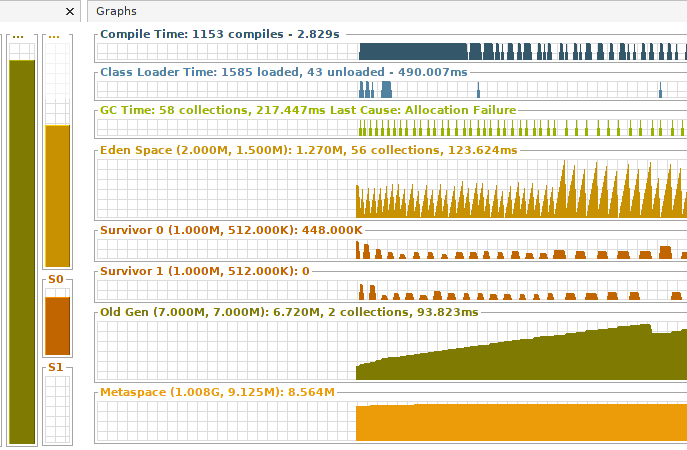
next - just switch into tab "Visual GC" from just installed plugin. It will be showing current state of all heap areas. We're interested at "Old Gen" area: as you can see, it's constantly growing. That means: GC can not remove from heap object's we're creating - something is definitely wrong with our application:


4. Memory analyzing tool(MAT)

At previous step we found that we have memory leak. Now, let's found which objects are being "mistakenly" created in heap. Of course we know that the problem is with "User" class which we're creating, but let's pretend what we don't know that :)

To analyze memory usage I used eclipse memory analyzer tool(MAT), it can be downloaded from here.
We have 2 options:
 - create dump using visualVM("Monitor" tab + "Head Dump" button)
 - connect  MAT directly to our process

I used second option:


After selecting my java process and pressing "Finish" - I selected "memory leaks" on next screen. And MAT showed me the result:
Size: 2.6 MB Classes: 499 Objects: 56.4k Class Loader: 3 Unreachable Objects Histogram


After clicking on largest (blue) area we can open list of objects with outgoing references: after several "drill-downs" we will be able to see next picture:


Of course, it's not a surprise for us: we have a very big ArrayList with objects of type User - that's our main problem.  We have to stop keeping references to new new objects in arrayList and we'll be fine.

5. The end 

Memo leaks are bad! :) The all heap space will be occupied we will have "out of memory error". So we have to try to avoid situations like described above.

Tuesday, January 23, 2018

Apache Kafka - getting started. Simple java project.

0. Intro

Kafka® is used for building real-time data pipelines and streaming apps. It is horizontally scalable, fault-tolerant, wicked fast, and runs in production in thousands of companies.

From wiki
The project aims to provide a unified, high-throughput, low-latency platform for handling real-time data feeds. Its storage layer is essentially a "massively scalable pub/sub message queue architected as a distributed transaction log,"[3] making it highly valuable for enterprise infrastructures to process streaming data. Additionally, Kafka connects to external systems (for data import/export) via Kafka Connect and provides Kafka Streams, a Java stream processing library.
The design is heavily influenced by transaction logs.[4]


Last time Apache Kafka is getting more and more popular. With growing popularity of event-sourcing concept, more and more developers are switching to Kafka as primary storage of events. Kafka has everything for this: it's very hast, compact, scalable, "user-friendly"....
In this post I'll show basic simple operations like "send"(by producer) and "receive"(by consumer) messages.


1. Downloading and running kafka

This page is explaining very well how to download and run kafka. If you're using Windows, you can use next commands from "bin/windows" folder:

Run these commands from your Kafka root folder:
cd bin/windows
Then run Zookeper server:
zookeeper-server-start.bat ../../config/zookeeper.properties
Then run Kafka server:
kafka-server-start.bat ../../config/server.properties

Now when kafka is running you can check it by creating a topic and getting topic list:

Create a topic:
kafka-topics.bat --create --zookeeper localhost:2181 --replication-factor 1 --partitions 1 --topic test0
List topics:
kafka-topics.bat --list --zookeeper localhost:2181

Response should be something like:
D:\Projects\kafka_2.11-1.0.0\bin\windows>kafka-topics.bat --list --zookeeper localhost:2181
test0


2. Project structure

Our project structure is very simple: we need just 2 files MessageProducer and MessageConsumer. 

build.gradle file:

group 'com.demien'version '1.0-SNAPSHOT'
apply plugin: 'java'
sourceCompatibility = 1.8
repositories {
    mavenCentral()
}

dependencies {
    compile 'org.apache.kafka:kafka-clients:0.9.0.0'    compile 'org.slf4j:slf4j-api:1.7.12'    compile 'org.slf4j:slf4j-log4j12:1.7.12'    compile 'log4j:log4j:1.2.17'

    testCompile group: 'junit', name: 'junit', version: '4.11'}


3. Producer

It designed as generic by KEY,VALUE types. Also I added to constructor optional messageSentCallback parameter - this callBack will be called when message was sent.


package com.demien.kafka;

import org.apache.kafka.clients.producer.RecordMetadata;
import org.apache.kafka.clients.producer.ProducerConfig;
import org.apache.kafka.clients.producer.KafkaProducer;
import org.apache.kafka.clients.producer.Producer;
import org.apache.kafka.clients.producer.ProducerRecord;

import java.util.Date;
import java.util.Properties;
import java.util.concurrent.CompletableFuture;
import java.util.concurrent.Future;
import java.util.function.Consumer;

public class MessageProducer<K, V> {

    private final Producer kafkaProducer;
    private final String topicName;
    private final Consumer<RecordMetadata> messageSentCallback;

    public MessageProducer(String topicName) {
        this(topicName, null);
    }

    public MessageProducer(String topicName, Consumer<RecordMetadata> messageSentCallback) {
        Properties configProperties = new Properties();
        configProperties.put(ProducerConfig.BOOTSTRAP_SERVERS_CONFIG, "localhost:9092");
        configProperties.put(ProducerConfig.KEY_SERIALIZER_CLASS_CONFIG, "org.apache.kafka.common.serialization.ByteArraySerializer");
        configProperties.put(ProducerConfig.VALUE_SERIALIZER_CLASS_CONFIG, "org.apache.kafka.common.serialization.StringSerializer");
        this.kafkaProducer = new KafkaProducer(configProperties);
        this.topicName = topicName;
        this.messageSentCallback = messageSentCallback;
    }


    public void sendMessage(K key, V value) {
        ProducerRecord<K, V> rec = new ProducerRecord<K, V>(topicName, key, value);
        Future<RecordMetadata> future = kafkaProducer.send(rec);
        if (messageSentCallback != null) {
            CompletableFuture.supplyAsync(() -> {
                try {
                    RecordMetadata recordMetadata = future.get();
                    messageSentCallback.accept(recordMetadata);
                } catch (Exception e) {
                }
                return null;
            });
        }
    }

    public void close() {
        kafkaProducer.close();
    }


    public static void main(String[] args) throws InterruptedException {
        MessageProducer<String, String> testProducer = new MessageProducer<String, String>("test0", (recordMetadata) -> {
            System.out.println("Message was sent: offset:" + recordMetadata.offset() + " partition:" + recordMetadata.partition() + " topic:" + recordMetadata.topic());
        });
        testProducer.sendMessage(null, "Test 1 " + new Date().toString());
        testProducer.sendMessage(null, "Test 2 " + new Date().toString());
        testProducer.sendMessage(null, "Test 3 " + new Date().toString());
        testProducer.close();
    }


}


4. Consumer

This class is more complicated, because it's designed to deal with the offsets for reading the data.
Consumer can start reading form the beginning, from the end, or from provided offset. That is why constructor is so complicated. Method for receiving messages is pretty simple. Supplier for cuncumed messages is provided in constructor.

package com.demien.kafka;

import org.apache.kafka.clients.consumer.*;
import org.apache.kafka.common.TopicPartition;

import java.util.Arrays;
import java.util.Collection;
import java.util.Iterator;
import java.util.Properties;

import java.util.function.BiConsumer;

public class MessageConsumer<K, V> {
    private final String topic;
    private final String groupId;
    private final long startingOffset;
    private final KafkaConsumer<K, V> kafkaConsumer;

    public MessageConsumer(String topic, String groupId) {
        this(topic, groupId, -1);
    }

    /**     * @param topic - id of topic     * @param groupId - id of consumer group     * @param startingOffset - offset to read messages. 0 - from the beginning.      *                       -1 - from the end. other values - start reading from this value                            */    public MessageConsumer(String topic, String groupId, long startingOffset) {
        this.topic = topic;
        this.groupId = groupId;
        this.startingOffset = startingOffset;

        Properties configProperties = new Properties();
        configProperties.put(ConsumerConfig.BOOTSTRAP_SERVERS_CONFIG, "localhost:9092");
        configProperties.put(ConsumerConfig.KEY_DESERIALIZER_CLASS_CONFIG, "org.apache.kafka.common.serialization.ByteArrayDeserializer");
        configProperties.put(ConsumerConfig.VALUE_DESERIALIZER_CLASS_CONFIG, "org.apache.kafka.common.serialization.StringDeserializer");
        configProperties.put(ConsumerConfig.GROUP_ID_CONFIG, groupId);
        configProperties.put(ConsumerConfig.CLIENT_ID_CONFIG, "testClient");
        configProperties.put(ConsumerConfig.ENABLE_AUTO_COMMIT_CONFIG, false);
        configProperties.put(ConsumerConfig.AUTO_OFFSET_RESET_CONFIG, "earliest");

        kafkaConsumer = new KafkaConsumer<>(configProperties);

        kafkaConsumer.subscribe(Arrays.asList(topic), new ConsumerRebalanceListener() {
            public void onPartitionsRevoked(Collection<TopicPartition> partitions) {
                System.out.printf("%s topic-partitions are revoked from this consumer\n", Arrays.toString(partitions.toArray()));
            }

            public void onPartitionsAssigned(Collection<TopicPartition> partitions) {
                System.out.printf("%s topic-partitions are assigned to this consumer\n", Arrays.toString(partitions.toArray()));
                Iterator<TopicPartition> topicPartitionIterator = partitions.iterator();
                while (topicPartitionIterator.hasNext()) {
                    TopicPartition topicPartition = topicPartitionIterator.next();
                    System.out.println("Current offset is " + kafkaConsumer.position(topicPartition) + " committed offset is ->" + kafkaConsumer.committed(topicPartition));
                    if (MessageConsumer.this.startingOffset == 0) {
                        System.out.println("Setting offset to begining");

                        kafkaConsumer.seekToBeginning(topicPartition);
                    } else if (MessageConsumer.this.startingOffset == -1) {
                        System.out.println("Setting it to the end ");

                        kafkaConsumer.seekToEnd(topicPartition);
                    } else {
                        System.out.println("Resetting offset to " + MessageConsumer.this.startingOffset);
                        kafkaConsumer.seek(topicPartition, MessageConsumer.this.startingOffset);
                    }
                }
            }
        });

    }

    public void startReceiving(BiConsumer<K, V> biConsumer) {
        try {
            while (true) {
                ConsumerRecords<K, V> records = kafkaConsumer.poll(100);
                records.forEach(record->  biConsumer.accept(record.key(), record.value()));
                if (startingOffset == -2) kafkaConsumer.commitSync();
            }
        } finally {
            kafkaConsumer.close();
        }
    }

    public static void main(String[] args) {
        final MessageConsumer<String, String> testConsumer = new MessageConsumer<>("test0", "testGroup");
        testConsumer.startReceiving( (k,v) -> System.out.println("received:"+v) );

    }
}


5. Execution 

Let's start the Consumer now. It should output something like:

[test0-0] topic-partitions are assigned to this consumer
Current offset is 0 committed offset is ->null


Now let's start the Producer. Is should send 3 test messages and print information about them:

Message was sent: offset:0 partition:0 topic:test0
Message was sent: offset:1 partition:0 topic:test0
Message was sent: offset:2 partition:0 topic:test0

Consumer also should print information about received messages:

received:Test 1 Tue Jan 23 15:36:29 CET 2018
received:Test 2 Tue Jan 23 15:36:29 CET 2018
received:Test 3 Tue Jan 23 15:36:29 CET 2018

Let's restart our consumer now. By default value in our constructor, if will be reading data from the end, so previous messages will not be shown:

[test0-0] topic-partitions are assigned to this consumer
Current offset is 3 committed offset is ->OffsetAndMetadata{offset=3, metadata=''}
Setting it to the end 


Now we can try to read previous messages by changing the constructor parameter:

public static void main(String[] args) {
    final MessageConsumer<String, String> testConsumer = new MessageConsumer<>("test0", "testGroup", 2);
    testConsumer.startReceiving( (k,v) -> System.out.println("received:"+v) );
}

- it's now 2 so we will be reading from offset 2. Let's restart it again:

[test0-0] topic-partitions are assigned to this consumer
Current offset is 3 committed offset is ->OffsetAndMetadata{offset=3, metadata=''}
Resetting offset to 2
received:Test 3 Tue Jan 23 15:36:29 CET 2018

- now last previous message with the offset 2 was read.

6. The end

Source code can be downloaded from here.

Thursday, November 9, 2017

Completable future (java 8) simple example

A long long time ago class Future was introduced in Java. Now, with Java 8 we have an "upgraded" version of it.

1. Regular "Future"

Futures are very useful objects: if some task which will be executed in another thread have to return some value - we can use Callable object which returns Futubre object. Later we will be able to get the value returned by task by executing .get method from returned Future. The problem here: when we are executing .get - we are blocked: if the value is not ready yet(long running task) we will be waiting till the value will finally be returned.

Let's write some code to recall our knowledge of Future:

Function for simulation of long running task:

public int longTask(int delay) {
    try {
        Thread.sleep(delay);
    } catch (InterruptedException e) {
        e.printStackTrace();
    }
    return delay;

}

Function for creation Callable from this long task:
public Callable<Integer> longCallable(int delay) {
    Callable<Integer> result = () -> longTask(delay);
    return result;
}


Function for submitting Callable by Executor and creation of Future:

public Future<Integer> longFuture(int delay) {
    return Executors.newWorkStealingPool().submit(longCallable(delay));
}

Debug function to print our Futures:

public void printFuture(Future<Integer> future) {
    try {
        System.out.println(future.get());
    } catch (InterruptedException e) {
        e.printStackTrace();
    } catch (ExecutionException e) {
        e.printStackTrace();
    }
}

Let's create an array with several futures:

public List<Future<Integer>> getTestFutures() {
    return IntStream.rangeClosed(1, 3)
            .<Future<Integer>>mapToObj(i -> longFuture(i))
            .collect(Collectors.toList());
}

Now we have a Futures, so let's take the values from them:  

public void blockingFutureGet() {
    getTestFutures().forEach(f -> printFuture(f));
}


And, as we mentioned before - we are blocked here. 
After next execution:  

System.out.println("Begin");
app.blockingFutureGet();
System.out.println("End");


Result will be: 
Begin
1
2
3
End

So, the main thread was blocked till we finally got ALL VALUES from the Futures. 
Sometimes such behavior is not acceptable: we may need to execute tasks in totally async way. 
For that purpose we may rewrite previous function this way: 


public void nonBlockingFutureGet() {
    new Thread(this::blockingFutureGet).start();
}

We are running additional thread to get values from the Futures.
The result will be:
Begin
End
1
2
3

-  the main thread was not blocked - it continued execution while another thread was getting values from Futures. But this approach little bit complicated: we have to submit our tasks, collect the futures, run additional thread, pass collected futures there and execute all needed manipulations. To make it simpler we can just use CompletableFutures.

2. CompletableFuture

And now let's compare all the code above with CompletableFuture implementation:

public void completableFuture() {
    IntStream.rangeClosed(1, 3).forEach(i ->
        CompletableFuture.supplyAsync(() -> longTask(i))
           .thenAccept(System.out::println)
    );
}

It's now much easier!  Also results can be forwarded further for additional tasks/operations:

public void completableFuture2() {
    IntStream.rangeClosed(1, 3).forEach(i ->
            CompletableFuture.supplyAsync(() -> longTask(i))
                    .thenApply(v->v*10)
                    .thenApply(v->Integer.toString(v)+"!")
                    .thenAccept(System.out::println)
                    .exceptionally(e-> {
                        System.out.println("We have a problem:"+e.getMessage());
                        return null;
                    })
    );
}

3. Running additional asynchronous tasks using thenCompose

In previous example we used thenApply method which executes tasks in synchronous way. But it can be asynchronous - we can execute thenCompose method and return another async task:

public void cfThenCompose() {
    IntStream.rangeClosed(1, 3)
            .mapToObj(i -> CompletableFuture.supplyAsync(() -> longTask(i * 1000)))
            .forEach(f -> f.thenCompose(j -> {
                             System.out.println(j);
                             return CompletableFuture.supplyAsync(() -> longTask(j + 1));
                         }).thenAccept(System.out::println)
                     );
}


Results of execution:
1000
2000
1001
3000
2001
3001

4. Combining results of 2 independent futures.

In a previous example we were running execution based on previous execution.But what if need result of 2 tasks for further computation? We can use thenCombine method or that:

public void cfThenCombine() {
    CompletableFuture<Integer> f1 = CompletableFuture.supplyAsync(()->longTask(1000));
    CompletableFuture<Integer> f2 = CompletableFuture.supplyAsync(()->longTask(2000));
    f1.thenCombine(f2, (r1, r2)-> r1+r2).thenAccept(System.out::println);
}

The result is, as expected:
3000

5. The end.

CompletableFutures as the big step forward for java in the direction of functional programming. 

Sunday, October 29, 2017

Spring bean lifecycle, postrocessors, profiler

0. intro

When we create object - we have only one entry point to modify somehow object state: constructor.
In Spring this process is much more complicated:


let's create a simple spring application to see how it goes.

1. Project structure

It's a regular gradle-java project.

conten of buid.gradle file:

group 'com.demien.spring'version '1.0-SNAPSHOT'
apply plugin: 'java'
sourceCompatibility = 1.8
repositories {
    mavenCentral()
}

dependencies {
    compile group: 'org.springframework', name: 'spring-core', version: '5.0.0.RELEASE'    
    compile group: 'org.springframework', name: 'spring-beans', version: '5.0.0.RELEASE'    compile group: 'org.springframework', name: 'spring-context', version: '5.0.0.RELEASE'
    testCompile group: 'junit', name: 'junit', version: '4.12'}


directory structure:


2. Annotations

For deep understanding of some life cycle phases let's create 2 annotations:

- Generate name annotation. If field is annotated by this annotation, that means we have to generate the value for this field - simulation of "name". For that we have also settings: minLenght and maxLenght  - length of name which we have to generate.

package com.demien.spring.lifecycle.annotations;

import java.lang.annotation.Retention;
import java.lang.annotation.RetentionPolicy;

@Retention(RetentionPolicy.RUNTIME)
public @interface GeneratedName {
    int minLength();
    int maxLength();
}

- Profiling annotation. If class has such annotation - we have to measure execution time of every class method.
package com.demien.spring.lifecycle.annotations;

import java.lang.annotation.Retention;
import java.lang.annotation.RetentionPolicy;

@Retention(RetentionPolicy.RUNTIME)
public @interface Profiling {
}


3. Spring bean - messenger

Now let's create a very simple bean which will be printing messages.

Interface is very simple: just 2 methods:

package com.demien.spring.lifecycle.beans;

public interface Messenger {
    void printMessage();
    void setUp(String symbol);
}


Implementation is more complicated:
  - we are using annotations from above
  - we have 3 "state" methods: constructor, init and setup


package com.demien.spring.lifecycle.beans;

import com.demien.spring.lifecycle.annotations.GeneratedName;
import com.demien.spring.lifecycle.annotations.Profiling;

import java.time.LocalTime;

@Profiling
public class SimpleMessenger implements Messenger {

    private String messageText = "NULL";
    private String symbol = "";

    @GeneratedName(minLength = 5, maxLength = 10)
    private String name;

    public SimpleMessenger() {
        System.out.print("Constructor: ");
        printMessage();
    }

    public void init() {
        System.out.print("Init: ");
        printMessage();
    }

    @Override    
    public void setUp(String symbol) {
        this.symbol = symbol;
        System.out.print("Setup: ");
        printMessage();
    }
public void setMessageText(String messageText) { this.messageText = messageText; } @Override
    public void printMessage() {
        System.out.println();
        System.out.println(messageText + ", " + name+symbol+" ["+ LocalTime.now()+"]");
    }


}


4. JMX profiler settings 

For profiler, it's better to have ability to turn on/off when it's needed. We can use JMX for that.
For JMX we need an interface which name ends by MBean and implementation of it:

package com.demien.spring.lifecycle.jmx;

public interface ProfilerSettingsMBean {
    void setEnabled(boolean enabled);
}


package com.demien.spring.lifecycle.jmx;

public class ProfilerSettings implements ProfilerSettingsMBean {

    private boolean enabled;

    public boolean isEnabled() {
        return enabled;
    }

    public void setEnabled(boolean enabled) {
        this.enabled = enabled;
    }
}


5. AppConfig

It's the most complicated and interesting part of our application.

- definition of message bean. Here we also defining "init-method" which will be executed after bean initialization.

@Bean(initMethod = "init")
Messenger messenger() {
    SimpleMessenger messenger = new SimpleMessenger();
    messenger.setMessageText("Hello");
    return messenger;
}
-

- We want to do some actions(execute messenger.setUp method) when spring created application context - on context refresh event.

@Bean
ApplicationListener<ContextRefreshedEvent> refreshedEventApplicationListener() {
    return new ApplicationListener<ContextRefreshedEvent>() {
        @Override        
        public void onApplicationEvent(ContextRefreshedEvent event) {
            ApplicationContext ctx = event.getApplicationContext();
            Messenger messenger = ctx.getBean(Messenger.class);
            messenger.setUp("!");
        }
    };

}

- we need post processor for dealing with annotation @GeneratedName - we have to generate name and put it into such field.

@Bean
BeanPostProcessor nameGenerationPostProcessor() {

    return new BeanPostProcessor() {
        @Override        
        public Object postProcessBeforeInitialization(Object bean, String beanName) throws BeansException {
            Field[] fields = bean.getClass().getDeclaredFields();
            for (Field field : fields) {
                GeneratedName annotation = field.getAnnotation(GeneratedName.class);
                if (annotation != null) {
                    field.setAccessible(true);
                    ReflectionUtils.setField(field, bean, generateName(annotation.minLength(), annotation.maxLength()));
                }
            }
            return bean;
        }

    };
}


- and also we have to process @Profiling annotation.
For that we can on "beforeInitalization" phase store classes which have such annotation. And on "afterInilialization" phase we can return "proxy" object which will be printing execution time after method invocation if such settings is turned on.

@Bean
BeanPostProcessor profilingPostProcessor() throws Exception {
    Map<String, Class> map = new HashMap<>();
    ProfilerSettings profilerSettings = new ProfilerSettings();
    MBeanServer beanServer = ManagementFactory.getPlatformMBeanServer();
    beanServer.registerMBean(profilerSettings, new ObjectName("Profiling", "name", "settings"));

    return new BeanPostProcessor() {

        @Override        
        public Object postProcessBeforeInitialization(Object bean, String beanName) throws BeansException {
            Class<?> beanClass = bean.getClass();
            if (beanClass.isAnnotationPresent(Profiling.class)) {
                map.put(beanName, beanClass);
            }
            return null;
        }

        @Override        
        public Object postProcessAfterInitialization(Object bean, String beanName) throws BeansException {
            Class beanClass = map.get(beanName);
            if (beanClass != null) {
                return Proxy.newProxyInstance(beanClass.getClassLoader(), beanClass.getInterfaces(), new InvocationHandler() {
                    @Override                    public Object invoke(Object proxy, Method method, Object[] objects) throws Throwable {
                        long before = System.nanoTime();

                        Object retval = method.invoke(bean, objects);
                        if (profilerSettings.isEnabled()) {
                            System.out.println("exec time:" + (System.nanoTime() - before));
                        }
                        return retval;
                    }
                });
            }
            return null;
        }
    };
}

6. Main app class

Here we just creating sprint context and executing in a loop printMessage method of our messenger.

package com.demien.spring.lifecycle;

import com.demien.spring.lifecycle.beans.Messenger;
import org.springframework.context.annotation.AnnotationConfigApplicationContext;

public class App {

    public static void main(String[] args) throws InterruptedException {

        AnnotationConfigApplicationContext ctx = new AnnotationConfigApplicationContext();
        ctx.register(AppConfig.class);
        ctx.refresh();
        Messenger messenger = ctx.getBean(Messenger.class);

        System.out.println();
        System.out.println("Execution started");
        while (true) {
            Thread.sleep(3000);
            messenger.printMessage();
        }

    }
}


7. Execution

Now we can run our application:

Constructor: 
NULL, null [21:27:53.542]
Init: 
Hello, Mosxrak [21:27:53.553]
Setup: 
Hello, Mosxrak! [21:27:53.678]

Execution started

Hello, Mosxrak! [21:27:56.682]

Hello, Mosxrak! [21:27:59.683]

Hello, Mosxrak! [21:28:02.683]

Here we can see all phases of bean lifecycle in spring:
- first of all, of course, constructor is executed. On this phase nothing was injected into our bean, that is why we have nulls.
- init method was executed when spring created the bean. So bean has message and also post processor generated name
- the last method is "setup" - it was executed when the whole context was created and refreshed. 

8. Turning on profiling 

Now let's test how profiling works. We have to connect JMX client (for example JConsole, or VisualVM) and connect it to our application.


In Profiling/Settings we can see our flag "enaled" - here we have to enter "true" and press "enter".
After this operation output will be changed:


Hello, Cswwjksic! [21:37:28.926]

Hello, Cswwjksic! [21:37:31.926]

Hello, Cswwjksic! [21:37:34.926]

Hello, Cswwjksic! [21:37:37.928]
exec time:1931750

Hello, Cswwjksic! [21:37:40.929]
exec time:235493

Hello, Cswwjksic! [21:37:43.929]
exec time:184623

Hello, Cswwjksic! [21:37:46.930]
exec time:340191

Hello, Cswwjksic! [21:37:49.930]
exec time:358737


After turning on our profiler prints execution time - so everything works as expected.


9. The end

Full source code can be downloaded from here

Tuesday, July 11, 2017

Selenium Java getting started

1. Intro

What is selenium?

From wiki:
Selenium is a portable software-testing framework for web applications. Selenium provides a record/playback tool for authoring tests without the need to learn a test scripting language (Selenium IDE). It also provides a test domain-specific language (Selenese) to write tests in a number of popular programming languages, including C#GroovyJavaPerlPHPPythonRuby and Scala. The tests can then run against most modern web browsers. Selenium deploys on WindowsLinux, and OS X platforms. It is open-source software, released under the Apache 2.0 license: web developers can download and use it without charge.

Let's try to do some simple tasks using this library. I want to use if for testing my simple ReactJS application, which I created week ago.


2. How it works. 

With selenium we can "emulate" all user actions we need: entering text into input fields, clicking the buttons, checking checkboxes and many others. But first of all, we need to find somehow element for which we want to perform such actions. In selenium there are a lot of options for doing this:

  • by id
  • by name
  • by tag name 
  • ....


In this post I'm using the simplest way: by element id.
Example: driver.findElement(By.id("submit-department").click();

Here is a list of html elements which I will be accessing by theirs ids:


3. SetUp

There are just few things to start working with selenium:

  • first of all we have to add to our project selenium dependency. Example for  gradle:

      compile group: 'org.seleniumhq.selenium', name: 'selenium-java', version: '2.41.0'
  • also we need the driver for your favorite browser. For example for ChromeBrowser you can download it from here. You have have to unpack it and put it somewhere in file system. 
  • And finally, driver binary from previous step, have to be set up as system property in your code this way:
System.setProperty("webdriver.chrome.driver", "d:/dev/selenium/chromedriver.exe");

After that we can try to create the instance of driver and open something with the browser:
WebDriver driver = new ChromeDriver();
driver.get("http://localhost:3000");

-it should run the browser and navigate it to page from code above.


4. Testing 

I wrote very simple application which creates several departments and after that several users. And users creation goes using departments created before. At the end I'm checking if all departments and users were created.


package com.demien.seltest;

import org.openqa.selenium.By;
import org.openqa.selenium.WebDriver;
import org.openqa.selenium.WebElement;
import org.openqa.selenium.chrome.ChromeDriver;
import org.openqa.selenium.support.ui.Select;

import java.util.Arrays;
import java.util.LinkedList;
import java.util.List;

public class App {

    static WebDriver driver;

    public static void clearAndSet(String id, String value) {
        driver.findElement(By.id(id)).clear();
        driver.findElement(By.id(id)).sendKeys(value);
    }

    public static void click(String id) {
        driver.findElement(By.id(id)).click();
    }

    public static void select(String id, String option) {
        Select select = new Select(driver.findElement(By.id(id)));
        select.selectByVisibleText(option);
    }

    public static void addDepartment(String id, String name) {
        clearAndSet("input-departments-id", id);
        clearAndSet("input-departments-name", name);
        click("submit-departments");
    }

    public static void addUser(String id, String name, String email, String department) {
        clearAndSet("input-users-id", id);
        clearAndSet("input-users-name", name);
        clearAndSet("input-users-email", email);
        select("select-users-department", department);
        click("submit-users");
    }

    public static void checkTable(String id, List<String> values) {
        WebElement table = driver.findElement(By.id(id));

        List<WebElement> allRows = table.findElements(By.tagName("tr"));
        for (WebElement row : allRows) {
            List<WebElement> cells = row.findElements(By.tagName("td"));
            for (WebElement cell : cells) {
                values.remove(cell.getText());
            }
        }

        if (values.size() > 0) {
            throw new RuntimeException("Some elements are absent in table:" + Arrays.toString(values.toArray()));
        }
    }

    public static void checkTable(String id, String... values) {
        checkTable(id, new LinkedList<>(Arrays.asList(values)));
    }

    public static void main(String[] args) {
        System.setProperty("webdriver.chrome.driver", "d:/dev/selenium/chromedriver.exe");
        driver = new ChromeDriver();

        driver.get("http://localhost:3000");

        addDepartment("IT", "Informational technologies");
        addDepartment("ADM", "Administration");
        addDepartment("SEQ", "Security");

        checkTable("table-departments", "IT", "ADM", "SEQ", "Informational technologies", "Administration", "Security");

        addUser("JBL", "Joe Black", "joe.black@email.com", "Security");
        addUser("HSEB", "Huan Sebastyan", "huan.sebastyan@email.com", "Administration");

        checkTable("table-users", "JBL", "Joe Black", "joe.black@email.com", "Security", "HSEB", "Huan Sebastyan", "huan.sebastyan@email.com", "Administration");

    }
}

5. The end 

As a result, using just code from above, I created 3 departments and 2 users.


Source code can be downloaded from here