Monday, May 9, 2016

SPARK - rest framework for java


Don't be surprised : ApacheSpark and SparkJava - it's a 2 different technologies !
In this post a'm talking about SparkJava - simple rest framework for Java :  http://sparkjava.com/

Related posts :
Spring Boot - simple example
SpringBoot with SpringData and H2 database

SpringBoot is a very good framework, but it takes as dependencies almost full stack of all Spring libraries. And if you are not planing to use them in your project - you will start thinking about more "compact" rest frameworks. SparkJava is one of them.

1. Goal 

As a lazy developer I want to create a rest application with ability to add new entities in very simple way : by just extending "base" class :
GenericController<Item> itemController=new GenericController<Item>("/item", Item.class, itemService);


2. Application structure

Standard "mave-based" application structure:
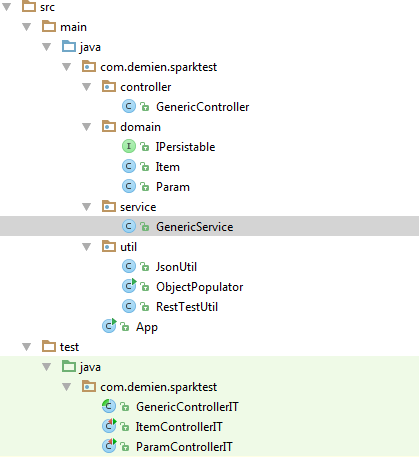

3.Maven project(pom.xml) file

Just spark,slfj,gson and junit dependencies:

<?xml version="1.0" encoding="UTF-8"?><project xmlns="http://maven.apache.org/POM/4.0.0"         xmlns:xsi="http://www.w3.org/2001/XMLSchema-instance"         xsi:schemaLocation="http://maven.apache.org/POM/4.0.0 http://maven.apache.org/xsd/maven-4.0.0.xsd">
    <modelVersion>4.0.0</modelVersion>

    <groupId>com.demien</groupId>
    <artifactId>sparktest</artifactId>
    <version>1.0-SNAPSHOT</version>

    <dependencies>
    <dependency>
        <groupId>com.sparkjava</groupId>
        <artifactId>spark-core</artifactId>
        <version>2.0.0</version>
    </dependency>
    <dependency>
        <groupId>org.slf4j</groupId>
        <artifactId>slf4j-simple</artifactId>
        <version>1.7.7</version>
    </dependency>
        <dependency>
            <groupId>com.google.code.gson</groupId>
            <artifactId>gson</artifactId>
            <version>2.2.4</version>
        </dependency>
        <dependency>
            <groupId>junit</groupId>
            <artifactId>junit</artifactId>
            <version>4.12</version>
        </dependency>

    </dependencies>


</project>


4. Domain objects

For my POJO data objects i created interface  IPersistable
public interface IPersistable {
    Long getId();
    void setId(Long id);

}

For having ability to operate ID field(by getId method) in controllers and test classes. So, all my domain objects are implementing this interface :

public class Item implements IPersistable {

    private Long id;
    private String name;
    private Long parentId;

public class Param implements IPersistable {

    private Long id;
    private String name;
    private String dataType;
    private Item item;

5. Controller

As I mentioned before, I'm too lazy, so I want to move common operations like "add", "get", "update", "delete" into one class :

package com.demien.sparktest.controller;

import com.demien.sparktest.util.JsonUtil;
import com.demien.sparktest.domain.IPersistable;
import com.demien.sparktest.service.GenericService;
import spark.Request;
import spark.Response;
import spark.Spark;

public class GenericController<T extends IPersistable> {
    private GenericService<T> service;
    private Class<T> cl;

    public GenericController(String basePath, Class<T> cl, GenericService<T> service) {
        this.cl=cl;
        this.service=service;
        Spark.get(basePath,this::getAll, JsonUtil::toJson);
        Spark.get(basePath+"/:id",this::getById, JsonUtil::toJson);
        Spark.get(basePath+"/test",this::test, JsonUtil::toJson);
        Spark.post(basePath,this::add, JsonUtil::toJson);
        Spark.put(basePath,this::update, JsonUtil::toJson);
        Spark.delete(basePath,this::delete, JsonUtil::toJson);
    }

    public Object test(Request request, Response response) {
        return "Hello world!";
    }

    public Object getAll(Request request, Response response) {
        return service.getAll();
    }

    public Object getById(Request request, Response response) {
        String id = request.params(":id");
        return service.getById(Long.parseLong(id));
    }

    public T restoreObjectFromRequest(Request request) {
        return (T)JsonUtil.toObject(request.body(),cl);
    }

    public Object add(Request request, Response response) {
        return service.add(restoreObjectFromRequest(request));
    }

    public Object update(Request request, Response response) {
        return service.update(restoreObjectFromRequest(request));
    }

    public Object delete(Request request, Response response) {
        service.delete(restoreObjectFromRequest(request));
        return "";
     }


}

So, now, for my entities(item and param) I have just to extend this class, without creation of controllers  :
GenericController<Item> itemController=new GenericController<Item>(ITEM_PATH, Item.class, itemService);
GenericController<Param> paramController=new GenericController<Param>(PARAM_PATH, Param.class, paramService);


6. "Dummy" service. 

It's just a simple demo project, so I decided not to use Hibernate, and created simple class for storing objects in a HashMap :

package com.demien.sparktest.service;

import com.demien.sparktest.domain.IPersistable;

import java.util.ArrayList;
import java.util.HashMap;
import java.util.List;
import java.util.Map;

public class GenericService<T extends IPersistable> {
    private Long maxId=0L;

    private Map<Long, T> storage=new HashMap<Long, T>();

    public void clearStorage() {
        storage.clear();
    }

    public T getById(Long id) {
        return storage.get(id);
    }

    public T add(T element) {
        Long id=element.getId();
        if (id==null) {
            maxId++;
            element.setId(maxId);
        } else {
            if (maxId.longValue()<id.longValue()) {
                maxId=id+1;
            }
        }
        return update(element);
    }

    public List<T> getAll() {
        List<T> result=new ArrayList<T>();
        for (T element:storage.values()) {
            result.add(element);
        }
        return result;
    }

    public T update(T element) {
        storage.put(element.getId(), element);
        return storage.get(element.getId());
    }

    public void delete(T element) {
        storage.remove(element.getId());
    }

}

7. Main application file. 

Spark is running just like regular java application. In main() procedure i have to "start" my controllers :
package com.demien.sparktest;

import com.demien.sparktest.controller.GenericController;
import com.demien.sparktest.domain.Param;
import com.demien.sparktest.service.GenericService;
import spark.Spark;
import com.demien.sparktest.domain.Item;

public class App {

    public final static int SPARK_PORT=8080;
    public final static String APP_PATH="http://localhost:"+SPARK_PORT;

    public final static GenericService<Item> itemService=new GenericService<>();
    public final static String ITEM_PATH="/item";

    public final static GenericService<Param> paramService=new GenericService<>();
    public final static String PARAM_PATH="/param";

    public static void main(String[] args) {
        Spark.setPort(8080);
        GenericController<Item> itemController=new GenericController<Item>(ITEM_PATH, Item.class, itemService);
        GenericController<Param> paramController=new GenericController<Param>(PARAM_PATH, Param.class, paramService);
    }

}

8. Utils

Also I had to create few simple utils :


8.1. JsonUtil  - just for conversion json<=>object

package com.demien.sparktest.util;

import com.google.gson.Gson;

public class JsonUtil {
    public static String toJson(Object object) {
        return new Gson().toJson(object);
    }

    public static Object toObject(String json, Class<?> cl) {
        return new Gson().fromJson(json, cl);
    }
}


8.2. RestTestUtil  - for testing : sending requests 

package com.demien.sparktest.util;

import java.io.*;
import java.net.HttpURLConnection;
import java.net.URL;
import java.nio.charset.StandardCharsets;

public class RestTestUtil {

    public static class RequestResult {

        public final String body;
        public final int status;

        private RequestResult(int status, String body) {
            this.body = body;
            this.status = status;
        }
    }

    public static RequestResult sendRequest(String method, String path, String urlParameters) throws IOException {

        URL url = new URL(path);
        HttpURLConnection conn = (HttpURLConnection) url.openConnection();
        conn.setDoOutput(true);
        conn.setInstanceFollowRedirects(false);
        conn.setRequestMethod(method);

        if (urlParameters!=null) {
            byte[] postData = urlParameters.getBytes(StandardCharsets.UTF_8);
            int postDataLength = postData.length;

            conn.setRequestProperty("Content-Type", "application/x-www-form-urlencoded");
            conn.setRequestProperty("charset", "utf-8");
            conn.setRequestProperty("Content-Length", Integer.toString(postDataLength));
            conn.setUseCaches(false);
            conn.getOutputStream().write(postData);
        }

        Reader in = new BufferedReader(new InputStreamReader(conn.getInputStream(), "UTF-8"));
        StringBuilder sb = new StringBuilder();
        for (int c; (c = in.read()) >= 0; )
            sb.append((char) c);
        String responseBody = sb.toString();
        int responseCode=conn.getResponseCode();
        return new RequestResult(responseCode, responseBody);

    }

    public static RequestResult sendRequest(String method, String path) throws IOException {
        return sendRequest(method, path, null);
    }


}

8.3 object populator - for testing : to "fill" test object with random generated data. 

package com.demien.sparktest.util;

import com.demien.sparktest.domain.IPersistable;
import com.demien.sparktest.domain.Item;

import java.lang.reflect.Field;
import java.util.ArrayList;
import java.util.Date;
import java.util.List;

public class ObjectPopulator {

    interface RandomGenerator {
        Object getRandomValue();
    }

    enum DataType {
        Integer(() -> {
            return new Integer((int) (Math.random() * 1000));
        }),
        Long(() -> {
            return new Long((long) (Math.random() * 1000));
        }),
        Date(()-> {
            return new Date(new Date().getTime() - (int) (Math.random() * 1000 * 60 * 60 * 24 * 100));
        }),
        String(() -> {
            StringBuffer result = new StringBuffer();
            String[] letters = new String[]{"A", "B", "C", "D", "E", "F", "G"};
            int length = (int) (Math.random() * 15) + 5;
            for (int i = 0; i < length; i++) {
                int pos = (int) (Math.random() * letters.length);
                result.append(letters[pos]);
            }
            return result.toString();
        }
        );

        private RandomGenerator generator;

        DataType(RandomGenerator generator) {
            this.generator = generator;
        }

        Object getRandomValue() {
            return generator.getRandomValue();
        }
    }

    public static Object populate(IPersistable instance) throws IllegalAccessException {
        List<Field> fields = getAllFields(instance);
        for (Field eachField : fields) {
            eachField.setAccessible(true);
            String typeName=eachField.getType().getSimpleName();
            if (eachField.getType().getTypeName().startsWith("com.demien")) {
                Object obj=null;
                try {
                     obj=eachField.getType().newInstance();
                } catch (InstantiationException e) {
                    e.printStackTrace();
                }
                obj=populate((IPersistable) obj);
                eachField.set(instance, obj);
            } else {
                DataType dataType = DataType.valueOf(typeName);
                eachField.set(instance, dataType.getRandomValue());
            }
        }
        return instance;
    }


    private static List<Field> getAllFields(Object instance) {
        Field[] fields = instance.getClass().getDeclaredFields();
        List<Field> result = new ArrayList<Field>();
        for (int i = 0; i < fields.length; i++) {
            if (!java.lang.reflect.Modifier.isFinal(fields[i].getModifiers())
                    && !java.lang.reflect.Modifier.isStatic(fields[i]
                    .getModifiers())) {
                result.add(fields[i]);
            }
        }
        return result;
    }

 
}

9. Generic integration test class

For base operations i created generic controller test class - other controllers will just extend it :
package com.demien.sparktest;

import com.demien.sparktest.domain.IPersistable;
import com.demien.sparktest.service.GenericService;
import com.demien.sparktest.util.JsonUtil;
import com.demien.sparktest.util.ObjectPopulator;
import com.demien.sparktest.util.RestTestUtil;
import org.junit.*;
import spark.Spark;

import java.util.List;

public abstract class GenericControllerIT<T extends IPersistable> {
    private String fullPath;
    private Class<T> cl;
    private GenericService<T> service;

    public GenericControllerIT(String basePath, Class<T> cl, GenericService<T> service){
        this.fullPath= App.APP_PATH+basePath;
        this.cl=cl;
        this.service=service;
    }

    @BeforeClass    public static void init() {
        App.main(null);
        try {
            Thread.sleep(5000);
        } catch (InterruptedException e) {
            e.printStackTrace();
        }
    }

    @AfterClass    public static void tearDown() {
        Spark.stop();
    }

    @Before    public void initTest() {
        service.clearStorage();
    }

    T getTestObject() throws Exception {
        T testObject=cl.newInstance();
        ObjectPopulator.populate(testObject);
        return testObject;
    }

    @Test    public void addTest() throws Exception {
        T testObject=getTestObject();
        RestTestUtil.RequestResult res= RestTestUtil.sendRequest("POST", fullPath, JsonUtil.toJson(testObject));
        Assert.assertEquals(200, res.status);
        Assert.assertEquals(service.getById(testObject.getId()), testObject);
    }

    @Test    public void getTest() throws Exception {
        T testObject=getTestObject();
        service.add(testObject);
        RestTestUtil.RequestResult res= RestTestUtil.sendRequest("GET", fullPath +"/"+testObject.getId());
        Assert.assertEquals(200, res.status);
        T receivedObject=(T)JsonUtil.toObject(res.body, cl);
        Assert.assertEquals(testObject, receivedObject);
    }

    @Test    public void getAllTest() throws Exception {
        T testObject1=getTestObject();
        service.add(testObject1);
        T testObject2=getTestObject();
        service.add(testObject2);
        RestTestUtil.RequestResult res= RestTestUtil.sendRequest("GET", fullPath);
        Assert.assertEquals(200, res.status);
        List<T> receivedObjectList=(List<T>)JsonUtil.toObject(res.body, java.util.List.class);
        Assert.assertTrue(receivedObjectList.size()==2);
    }


    @Test    public void updateTest() throws Exception {
        T testObject=getTestObject();
        service.add(testObject);
        T updatedObject=getTestObject();
        updatedObject.setId(testObject.getId());

        RestTestUtil.RequestResult res= RestTestUtil.sendRequest("PUT", fullPath, JsonUtil.toJson(updatedObject));
        Assert.assertEquals(200, res.status);

        T updatedObjectFromService=service.getById(testObject.getId());
        Assert.assertEquals(updatedObject, updatedObjectFromService);
    }

    @Test    public void deleteTest() throws Exception {
        T testObject=getTestObject();
        service.add(testObject);

        RestTestUtil.RequestResult res= RestTestUtil.sendRequest("DELETE", fullPath, JsonUtil.toJson(testObject));
        Assert.assertEquals(200, res.status);

        T deletedObject=service.getById(testObject.getId());
        Assert.assertNull(deletedObject);
    }


}


10. Integration test classes for ItemController and ParamController. 

Now we can just extend GenericControlerIT class and all tests for base operation will be inherited :

package com.demien.sparktest;

import com.demien.sparktest.domain.Item;

public class ItemControllerIT extends GenericControllerIT<Item> {
    public ItemControllerIT() {
        super(App.ITEM_PATH, Item.class, App.itemService);
    }
}


package com.demien.sparktest;

import com.demien.sparktest.domain.Param;

public class ParamControllerIT extends GenericControllerIT<Param> {
    public ParamControllerIT() {
        super(App.PARAM_PATH, Param.class, App.paramService);
    }
}

11. The end

Complete source code can be downloaded from here.

Sunday, January 24, 2016

Mongo DB getting started - CRUD operations - java

1. Intro

First of all we have to add mongo dependency into pom.xml file :
<dependency>
  <groupId>org.mongodb</groupId>
  <artifactId>mongo-java-driver</artifactId>
  <version>3.2.0</version>
</dependency>

After that, we can connect to mongo db  in our application :
MongoClient mongoClient = new MongoClient();
MongoDatabase db = mongoClient.getDatabase("course");
MongoCollection<Document> coll=db.getCollection("findTest");

Also I wrote several simple functions which can be useful :

public int getRandomInt() {
    int result=(int)Math.round(Math.random()*1000);
    return result;
}

public List<Document> getAllDocs() {
    List<Document> docs=coll.find().into(new ArrayList<Document>());
    return docs;
}

public void printList(String comment, List<?> list) {
    System.out.println(comment + " " + Arrays.toString(list.toArray()));

}

2. Insert

Now let's try to insert some documents into our test collection.
Before inset, first we have to create a Document. To populate Document structure we can use "append" method :

coll.drop();
coll.insertOne(new Document().append("name","Fernando").append("age", 41));
coll.insertOne(new Document().append("name",new Document("fist_name","Huan").append("second_name","Sebastyan")).append("age",40));

Document john=new Document().append("name","John").append("age",32);
Document smith=new Document().append("name","Smith").append("age",25);
coll.insertMany(Arrays.asList(john, smith));

printList("inserted documents:",getAllDocs());

Results:
inserted documents: [
Document{{_id=56a4957ac6e31a20f88dbfdc, name=Fernando, age=41}}, Document{{_id=56a4957ac6e31a20f88dbfdd,
                     name=Document{{fist_name=Huan, second_name=Sebastyan}},
                     age=40}},
Document{{_id=56a4957ac6e31a20f88dbfde, name=John, age=32}}, Document{{_id=56a4957ac6e31a20f88dbfdf, name=Smith, age=25}}
]


3. Find - basic operations

Let's populate test collection :
coll.drop();
for (int i=0;i<10;i++) {
    Document doc=new Document("x",i);
    coll.insertOne(doc);
}

To get count of documents in collection : 
long cnt=coll.count();
System.out.println("Count of documents:"+cnt);

To get first element : 
Document firstDoc= coll.find().first();
System.out.println("First document :"+firstDoc.toJson());

To get all documents : 
List<Document> allDoc=coll.find().into(new ArrayList<Document>());
System.out.println("Array with collection documents :"+Arrays.toString(allDoc.toArray()));


Working with cursors : 
MongoCursor<Document> cursor=coll.find().iterator();

try {
    while (cursor.hasNext()) {
        Document doc=cursor.next();
        System.out.println(" document from cursor "+doc.toJson());
    }
} finally {
    cursor.close();
}

4. Find - filtering
Of course, most often operation - is to filter "find" results by some criteria. For that, we have to populate a Document with "criteria". Another option - is using "builders" from Filters class:

Let's create a test collection :

coll.drop();
for (int i=0;i<10;i++) {
    for (int j=0;j<5;j++) {
        Document doc=new Document("x",i).append("y",j);
        coll.insertOne(doc);
    }

}

Just a simple filter : 
Document simpleFilter=new Document("x",5);
List<Document> filteredDocs=coll.find(simpleFilter).into(new ArrayList<Document>());
System.out.println("Filtered by [x=5] documents:" + Arrays.toString(filteredDocs.toArray()));


More complex filter : 
Document complexFilter=new Document("x",5).append("y", new Document("$gt", 3));
filteredDocs=coll.find(complexFilter).into(new ArrayList<Document>());
System.out.println("Filtered by [x=5 && y>3] documents:" + Arrays.toString(filteredDocs.toArray()));


Using Filter builder : 
Bson bsonFilter= Filters.and(Filters.eq("x", 5), Filters.lt("y", 3));
filteredDocs=coll.find(bsonFilter).into(new ArrayList<Document>());
System.out.println("Filtered by [x=5 && y<3] documents:" + Arrays.toString(filteredDocs.toArray()));

Results : 
Filtered by [x=5] documents:[Document{{_id=56a49896c6e31a21ddc31eee, x=5, y=0}}, Document{{_id=56a49896c6e31a21ddc31eef, x=5, y=1}}, Document{{_id=56a49896c6e31a21ddc31ef0, x=5, y=2}}, Document{{_id=56a49896c6e31a21ddc31ef1, x=5, y=3}}, Document{{_id=56a49896c6e31a21ddc31ef2, x=5, y=4}}]
Filtered by [x=5 && y>3] documents:[Document{{_id=56a49896c6e31a21ddc31ef2, x=5, y=4}}]
Filtered by [x=5 && y<3] documents:[Document{{_id=56a49896c6e31a21ddc31eee, x=5, y=0}}, Document{{_id=56a49896c6e31a21ddc31eef, x=5, y=1}}, Document{{_id=56a49896c6e31a21ddc31ef0, x=5, y=2}}]

5. Find - projection

Sometimes, in result set we don't need all fields, but only some specific. For that purpose we can use "projection" documents, in which we will specify which fields we want to show or hide. And, also, like with filters, we can use builders "Projections". 

Let's create one test object : 
coll.drop();
coll.insertOne(new Document("name", "Joe").append("age", 32));

Filter : 
Bson filter=new Document("name","Joe");

Projection with hiding fields "age" and "_id" : 
Bson projection=new Document().append("age",0).append("_id", 0);
List<Document> docs= coll.find(filter).projection(projection).into(new ArrayList<Document>());
System.out.println("filtered with projection[name]:"+Arrays.toString(docs.toArray()));

Hiding of "_id" field using builder : 
projection= Projections.exclude("_id");
docs= coll.find(filter).projection(projection).into(new ArrayList<Document>());
System.out.println("filtered with projection[name,age]:"+Arrays.toString(docs.toArray()));

Hiding of "_id" field and including "age" filed using builder :
projection= Projections.fields( Projections.excludeId(), Projections.include("age")); docs= coll.find(filter).projection(projection).into(new ArrayList<Document>()); System.out.println("filtered with projection[age]:"+Arrays.toString(docs.toArray()));

Results : 
filtered with projection[name]:[Document{{name=Joe}}]
filtered with projection[name,age]:[Document{{name=Joe, age=32}}]
filtered with projection[age]:[Document{{age=32}}]


6. Find - sorting

To sort by some criteria, as usual we have 2 options : 1. just create a "sort document" 2. use builder: 

Create test collection: 
coll.drop();
for (int i=0;i<1000;i++) {
    coll.insertOne(new Document("x",getRandomInt()).append("y", getRandomInt()).append("z", getRandomInt()));
}

Filter:
Document filterXlt10=new Document("x", new Document("$lt",10) );

Sort document : 
Document sortByXasc=new Document("x",1);
List<Document> docs=coll.find().filter(filterXlt10).sort(sortByXasc).into(new ArrayList<Document>());
printList("filtered by x<10 and sorted by x asc",docs);
filtered by x<10 and sorted by x asc [
Document{{_id=56a49c2fc6e31a231094c9a1, x=2, y=582, z=852}}, Document{{_id=56a49c2fc6e31a231094c958, x=3, y=688, z=922}}, Document{{_id=56a49c2fc6e31a231094c95e, x=3, y=74, z=396}}, Document{{_id=56a49c2fc6e31a231094c9b2, x=3, y=736, z=131}}, Document{{_id=56a49c2fc6e31a231094c9f4, x=3, y=35, z=856}}, Document{{_id=56a49c2fc6e31a231094cba5, x=4, y=369, z=14}}, Document{{_id=56a49c2fc6e31a231094cb02, x=5, y=990, z=816}}, Document{{_id=56a49c2ec6e31a231094c8d8, x=7, y=535, z=501}}, Document{{_id=56a49c2fc6e31a231094cb75, x=7, y=34, z=933}}, Document{{_id=56a49c2fc6e31a231094cbb4, x=8, y=795, z=878}}, Document{{_id=56a49c30c6e31a231094cbd0, x=8, y=989, z=255}}, Document{{_id=56a49c2fc6e31a231094ca17, x=9, y=486, z=603}}, Document{{_id=56a49c2fc6e31a231094cacc, x=9, y=843, z=457}}]
Sorting using builder : Bson sortYDesc= Sorts.descending("y"); docs=coll.find().filter(filterXlt10).sort(sortYDesc).into(new ArrayList<Document>()); printList("filtered by x<10 and sorted by y desc",docs);

filtered by x<10 and sorted by y desc [
Document{{_id=56a49c2fc6e31a231094cb02, x=5, y=990, z=816}}, Document{{_id=56a49c30c6e31a231094cbd0, x=8, y=989, z=255}}, Document{{_id=56a49c2fc6e31a231094cacc, x=9, y=843, z=457}}, Document{{_id=56a49c2fc6e31a231094cbb4, x=8, y=795, z=878}}, Document{{_id=56a49c2fc6e31a231094c9b2, x=3, y=736, z=131}}, Document{{_id=56a49c2fc6e31a231094c958, x=3, y=688, z=922}}, Document{{_id=56a49c2fc6e31a231094c9a1, x=2, y=582, z=852}}, Document{{_id=56a49c2ec6e31a231094c8d8, x=7, y=535, z=501}}, Document{{_id=56a49c2fc6e31a231094ca17, x=9, y=486, z=603}}, Document{{_id=56a49c2fc6e31a231094cba5, x=4, y=369, z=14}}, Document{{_id=56a49c2fc6e31a231094c95e, x=3, y=74, z=396}}, Document{{_id=56a49c2fc6e31a231094c9f4, x=3, y=35, z=856}}, Document{{_id=56a49c2fc6e31a231094cb75, x=7, y=34, z=933}}]

Complex sorting: 
Bson sortXascYdesc=Sorts.orderBy(Sorts.ascending("x"), Sorts.descending("y"));
docs=coll.find().filter(filterXlt10).sort(sortXascYdesc).into(new ArrayList<Document>());
printList("filtered by x<10 and sorted by x asc and y desc",docs); 

filtered by x<10 and sorted by x asc and  y desc [
Document{{_id=56a49c2fc6e31a231094c9a1, x=2, y=582, z=852}}, Document{{_id=56a49c2fc6e31a231094c9b2, x=3, y=736, z=131}}, Document{{_id=56a49c2fc6e31a231094c958, x=3, y=688, z=922}}, Document{{_id=56a49c2fc6e31a231094c95e, x=3, y=74, z=396}}, Document{{_id=56a49c2fc6e31a231094c9f4, x=3, y=35, z=856}}, Document{{_id=56a49c2fc6e31a231094cba5, x=4, y=369, z=14}}, Document{{_id=56a49c2fc6e31a231094cb02, x=5, y=990, z=816}}, Document{{_id=56a49c2ec6e31a231094c8d8, x=7, y=535, z=501}}, Document{{_id=56a49c2fc6e31a231094cb75, x=7, y=34, z=933}}, Document{{_id=56a49c30c6e31a231094cbd0, x=8, y=989, z=255}}, Document{{_id=56a49c2fc6e31a231094cbb4, x=8, y=795, z=878}}, Document{{_id=56a49c2fc6e31a231094cacc, x=9, y=843, z=457}}, Document{{_id=56a49c2fc6e31a231094ca17, x=9, y=486, z=603}}]


7. Find - limit and skip 

Everything is very simple here : 2 additional methods "limit" and "skip" for that : 

coll.drop();
for (int i=0;i<1000;i++) {
    coll.insertOne(new Document("x",i).append("y", getRandomInt()).append("z", getRandomInt()));
}
List<Document> docs=coll.find().limit(5).skip(20).into(new ArrayList<Document>());
printList("limit=5, skip=20",docs);

limit=5, skip=20 [
Document{{_id=56a49d1ec6e31a2377101042, x=20, y=629, z=576}}, 
Document{{_id=56a49d1ec6e31a2377101043, x=21, y=152, z=835}}, 
Document{{_id=56a49d1ec6e31a2377101044, x=22, y=599, z=833}}, 
Document{{_id=56a49d1ec6e31a2377101045, x=23, y=252, z=136}}, 
Document{{_id=56a49d1ec6e31a2377101046, x=24, y=949, z=25}}]


8.Update

For update operation we need to define 2 objects : FILTER and VALUE. 
Format of operation : 
UPDATE(FILTER-which documents we want to update,VALUE-what exactly we have to put)
FILTER document - the same document which we use for FIND operation.  

VALUE document - it can just another NewDocument - in that case, document(s) which was(were) found by FILTER statement will be replaced with NewDocument. Another option - is using "$set" document : in that case we can identify what exactly we want to replace. 

Let's create a test collection : 
coll.drop();
for (int i=0;i<5;i++) {
    coll.insertOne(new Document("_id",i).append("x", i));
}
docs=getAllDocs();
printList("original collection",docs);
original collection [
Document{{_id=0, x=0}}, 
Document{{_id=1, x=1}}, 
Document{{_id=2, x=2}}, 
Document{{_id=3, x=3}}, 
Document{{_id=4, x=4}}]


Full replace of old document with the new one: 
coll.replaceOne(Filters.eq("x", 3), new Document("x", 333).append("state", "replaced"));
docs=getAllDocs();
printList("collection with replacing [_id=3] :", docs);

collection with replacing [_id=3] : [
Document{{_id=0, x=0}}, 
Document{{_id=1, x=1}}, 
Document{{_id=2, x=2}}, 
Document{{_id=3, x=333, state=replaced}}, 
Document{{_id=4, x=4}}]


Update of just one field using $set 
coll.updateOne(Filters.eq("_id", 2), new Document("$set", new Document("state", "updated")));
docs=getAllDocs();
printList("collection with updating [_id=2] :", docs);

collection with updating [_id=2] : [
Document{{_id=0, x=0}}, 
Document{{_id=1, x=1}}, 
Document{{_id=2, x=2, state=updated}}, 
Document{{_id=3, x=333, state=replaced}}, 
Document{{_id=4, x=4}}]


Using "upsert" option : if record does not exists - it will be created.
coll.updateOne(Filters.eq("_id", 5), new Document("$set", new Document("state", "upserted")), new UpdateOptions().upsert(true));
docs=getAllDocs();
printList("collection with upserted [_id=5] :", docs);

collection with upserted [_id=5] : [
Document{{_id=0, x=0}}, 
Document{{_id=1, x=1}}, 
Document{{_id=2, x=2, state=updated}}, 
Document{{_id=3, x=333, state=replaced}}, 
Document{{_id=4, x=4}}, 
Document{{_id=5, state=upserted}}]


Update many records : 
coll.updateMany(new Document("_id",new Document("$lt",3)), new Document("$inc",new Document("x",10)));
docs=getAllDocs();
printList("collection with updated by [_id<3] set x=x+10",docs);

collection with updated by [_id<3] set x=x+10 [
Document{{_id=0, x=10}}, 
Document{{_id=1, x=11}}, 
Document{{_id=2, x=12, state=updated}}, 
Document{{_id=3, x=333, state=replaced}}, 
Document{{_id=4, x=4}}, 
Document{{_id=5, state=upserted}}]


9. Delete

Execution of delete is similar to "find" - we just need to specify how to find the object(s) , which of course will be deleted. 

Let's create a test collection : 
coll.drop();
for (int i=0;i<5;i++) {
    coll.insertOne(new Document("_id",i).append("x", i));
}

Original collection: 
docs=getAllDocs();
printList("original collection", docs);

original collection [
Document{{_id=0, x=0}}, 
Document{{_id=1, x=1}}, 
Document{{_id=2, x=2}}, 
Document{{_id=3, x=3}}, 
Document{{_id=4, x=4}}]
Delete several documents: 
coll.deleteMany(new Document("_id", new Document("$gt", 3)));docs=getAllDocs();
printList("deleted by DeleteMany by condition[_id>3]", docs);

deleted by DeleteMany by condition[_id>3] [
Document{{_id=0, x=0}}, 
Document{{_id=1, x=1}}, 
Document{{_id=2, x=2}}, 
Document{{_id=3, x=3}}]

Delete just one document: 
coll.deleteOne(new Document("_id", new Document("$gt",0)));docs=getAllDocs();
printList("deleted by DeleteOne by condition[_id>0]", docs); 

deleted by DeleteOne by condition[_id>0] [

Document{{_id=0, x=0}}, 

Document{{_id=2, x=2}}, 

Document{{_id=3, x=3}}]


10. Aggregation
Pipe for aggregation we can create in java code, or by parsing mongo documents : 
List<Document> pipeline=Arrays.asList(
        new Document("$group",
                 new Document("_id","$state").
                 append("totalPop", new Document("$sum", "$pop"))),
        new Document("$match",
                 new Document("totalPop",new Document("$gt",500000)))
);
List<Document> docs =coll.aggregate(pipeline).into(new ArrayList<Document>());
printList("aggregation:population>500000:",docs);


pipeline=Arrays.asList(Document.parse("{'$group':{'_id':'$state','totalPop':{'$sum':'$pop'}}}")
                      ,Document.parse("{'$match':{'totalPop': {'$lt':500000}}}")

);
docs =coll.aggregate(pipeline).into(new ArrayList<Document>());
printList("aggregation:population<500000:",docs);


result : 

aggregation:population>500000: [Document{{_id=CT, totalPop=661324}}, Document{{_id=CA, totalPop=953386}}, Document{{_id=NJ, totalPop=847495}}]
aggregation:population<500000: [Document{{_id=NY, totalPop=485267}}]


Thursday, January 14, 2016

Mongo DB getting started - CRUD operations - mongo shell

1. Insert

We can create json object this way:
doc={name:"Joe", age:32, profession:"hacker"}
{ "name" : "Joe", "age" : 32, "profession" : "hacker" }

After that we can put object into collection :
> db.people.insert(doc)
WriteResult({ "nInserted" : 1 })

Also, it's possible to put json object description just into insert method :
> db.people.insert({name:"Black", age:33, profession:"baker"})
WriteResult({ "nInserted" : 1 })


2. Select (Find)

Now we can check for just created records :
> db.people.find()
{ "_id" : ObjectId("56955a4eeab00cffbb649f10"), "name" : "Joe", "age" : 32, "profession" : "hacker" }
{ "_id" : ObjectId("56955d41eab00cffbb649f11"), "name" : "Black", "age" : 33, "profession" : "baker" }


_id field - is a primary key. If inserted object doesn't have such field(as in case above) - db will add it automatically. 

Method findOne() - returning just one random record as a result:
> db.people.findOne()
{
"_id" : ObjectId("56955a4eeab00cffbb649f10"),
"name" : "Joe",
"age" : 32,
"profession" : "hacker"
}

To find specific object we have to use search criteria : 
> db.people.findOne({name:"Black"})
{
"_id" : ObjectId("56955d41eab00cffbb649f11"),
"name" : "Black",
"age" : 33,
"profession" : "baker"
}

Also we can define which fields we want to be returned : 
> db.people.findOne({name:"Black"}, {name:true})
{ "_id" : ObjectId("56955d41eab00cffbb649f11"), "name" : "Black" }

- by default _id field is returned this way. So if we don't want to see it - we have explicitly hide it : 
> db.people.findOne({name:"Black"}, {name:true, _id:false})
{ "name" : "Black" }

For conditions like > and <  we need to make a substitution :> $gt, >=$gte, <$lt, <=$lte 
> db.people.find({age:{$gt:32, $lte:33}})
{ "_id" : ObjectId("56955d41eab00cffbb649f11"), "name" : "Black", "age" : 33, "profession" : "baker" }


For checking  of existence of some field we can use "exist" operator :  
> db.people.insert({name:"Unknown"})
WriteResult({ "nInserted" : 1 })
- record in contrary with previous ones doesn't have fields : age and profession.
To query such record :
> db.people.find({age:{$exists:false}})
{ "_id" : ObjectId("5695674feab00cffbb64aaca"), "name" : "Unknown" }

For regular expression queries : "regex" keyword :
> db.people.find({name:{$regex:"ck"}})
{ "_id" : ObjectId("56955d41eab00cffbb649f11"), "name" : "Black", "age" : 33, "profession" : "baker" }

For OR operator we can use "$or" :
> db.people.find({$or:[{name:{$regex:"ck"}},{age:{$exists:false}}]})
{ "_id" : ObjectId("56955d41eab00cffbb649f11"), "name" : "Black", "age" : 33, "profession" : "baker" }
{ "_id" : ObjectId("5695674feab00cffbb64aaca"), "name" : "Unknown" }

For AND operator  we can use ","
> db.people.find({name:{$regex:"ck",$regex:"Bl"}})
{ "_id" : ObjectId("56955d41eab00cffbb649f11"), "name" : "Black", "age" : 33, "profession" : "baker" }

3. Find  - Arrays

We have 3 documents with arrays : 
> db.accounts.find()
{ "_id" : ObjectId("5696aa17ab119bf16d1f92d7"), "name" : "Howard", "favorites" : [ "pretzels", "beer" ] }
{ "_id" : ObjectId("5696aa3aab119bf16d1f92d8"), "name" : "George", "favorites" : [ "ice cream", "pretzels" ] }
{ "_id" : ObjectId("5696abd0ab119bf16d1f92d9"), "name" : "Lucas", "favorites" : [ "beer", "cheese" ] }

With $all operator we can search for documents which contains all elements from list :  
> db.accounts.find({favorites:{$all:["beer","cheese"]}})
{ "_id" : ObjectId("5696abd0ab119bf16d1f92d9"), "name" : "Lucas", "favorites" : [ "beer", "cheese" ] }

With $in operator we can search for documents which contains at least one element from list :  
> db.accounts.find({favorites:{$in:["beer","cheese"]}})
{ "_id" : ObjectId("5696aa17ab119bf16d1f92d7"), "name" : "Howard", "favorites" : [ "pretzels", "beer" ] }
{ "_id" : ObjectId("5696abd0ab119bf16d1f92d9"), "name" : "Lucas", "favorites" : [ "beer", "cheese" ] }

4. Embedded documents.

Let's create a document with embedded document "email" :  
> db.users.insert({ name:"richard", email:{work:"richard@work.com", home:"richard@home.com"} })

To query this record by it embedded document we have to use "."  for complex field name :
> db.users.find({"email.work":"richard@work.com"})
{ "_id" : ObjectId("5696b64bab119bf16d1f92da"), "name" : "richard", "email" : { "work" : "richard@work.com", "home" : "richard@home.com" } }

5. Cursors 

We can create a cursor this way : 
> cur=db.users.find();null;
null

After we can just print it by typing it name. Or create a loop to print it content : 

> while (cur.hasNext()) printjson(cur.next())
{
"_id" : ObjectId("568d374c27073d1383c52d9e"),
"name" : "Andrew Erlichson",
"city_of_birth" : "Queens",
"favorite_color" : "blue"
}

We can also limit cursor resultset by executing "limit" method : 
cur.limit(5)

Also we can perform find() operation on our cursor : 
cur.find(....)

And sort : 
cur.sort({name:-1})

In addition we can skip several records from result set by "skip" method : 
cur.skip(2)

So, in case of executing : 
cur.sort({name: -1}).limit(5).skip(2)
Mongo will sort collection in reverse order by field "name", skip first 2 records and starting from record #3 it will return 5 records. 

Counting
To get just count of records without it returning we just have to replace "find" with "count" : 
> db.scores.count()
3000
> db.scores.count({type:"exam"})
1000

6. Updating

Let's say, we have a document : 
> db.people.find({name:"Unknown"})
{ "_id" : ObjectId("5695674feab00cffbb64aaca"), "name" : "Unknown" }

For update statement we need 2 objects : 1.matching object (like for "find" statement) 2.object which to be placed instead of original project  - it will replace the whole document, except _id field. 
> db.people.update({name:"Unknown"},{name:"Updated", age:100})
WriteResult({ "nMatched" : 1, "nUpserted" : 0, "nModified" : 1 })
> db.people.find({name:"Updated"})
{ "_id" : ObjectId("5695674feab00cffbb64aaca"), "name" : "Updated", "age" : 100 }
As you can see, object id remained the same, but content of the document was replaced. 

If we don't want to replace the whole document - we can use $set operator - it will update fields if they are exists, and insert them if they don't exist: 
> db.people.update({name:"Joe"}, {$set:{city:"Houston"}})
WriteResult({ "nMatched" : 1, "nUpserted" : 0, "nModified" : 1 })
- we just added city=Houston to existing fields of Joe, other fields remain the same :
> db.people.find({name:"Joe"})
{ "_id" : ObjectId("56955a4eeab00cffbb649f10"), "name" : "Joe", "age" : 32, "profession" : "hacker", "city" : "Houston" }
  
The opposite  operation is removing file - $unset operator. Using it we can remove just added field "city" : 
> db.people.update({name:"Joe"}, {$unset:{city:1}})
WriteResult({ "nMatched" : 1, "nUpserted" : 0, "nModified" : 1 })
> db.people.find({name:"Joe"})
{ "_id" : ObjectId("56955a4eeab00cffbb649f10"), "name" : "Joe", "age" : 32, "profession" : "hacker" }

7. Update - Arrays 

Let's create a record with array : 
> db.arrays.insert({_id:1, a:[1,2,3,4,5]})
WriteResult({ "nInserted" : 1 })

Now  we can update element of array : 
> db.arrays.update({_id:1}, {$set: {"a.2":33} })
WriteResult({ "nMatched" : 1, "nUpserted" : 0, "nModified" : 1 })
> db.arrays.find({_id:1})
{ "_id" : 1, "a" : [ 1, 2, 33, 4, 5 ] }

To add/remove elements  : push/pop operators : 
> db.arrays.update({_id:1}, {$push: {"a":6} })
WriteResult({ "nMatched" : 1, "nUpserted" : 0, "nModified" : 1 })
> db.arrays.find({_id:1})
{ "_id" : 1, "a" : [ 1, 2, 33, 4, 5, 6 ] }

> db.arrays.update({_id:1}, {$pop: {"a":1} })
WriteResult({ "nMatched" : 1, "nUpserted" : 0, "nModified" : 1 })
> db.arrays.find({_id:1})
{ "_id" : 1, "a" : [ 1, 2, 33, 4, 5 ] }

To add several element - $pushAll operator: 
> db.arrays.update({_id:1}, {$pushAll: {"a":[6,7,8,9,10]} })
WriteResult({ "nMatched" : 1, "nUpserted" : 0, "nModified" : 1 })
> db.arrays.find({_id:1})
{ "_id" : 1, "a" : [ 1, 2, 33, 4, 5, 6, 7, 8, 9, 10 ] }

To remove element by itposition  - $pull operator : 
> db.arrays.update({_id:1}, {$pull: {"a":1} })
WriteResult({ "nMatched" : 1, "nUpserted" : 0, "nModified" : 1 })
> db.arrays.find({_id:1})
{ "_id" : 1, "a" : [ 2, 33, 4, 5, 6, 7, 8, 9, 10 ] }

If we want to remove several elements - we can use $pullAll operator : 
> db.arrays.update({_id:1}, {$pullAll: {"a":[1,2,3]} })
WriteResult({ "nMatched" : 1, "nUpserted" : 0, "nModified" : 1 })
> db.arrays.find({_id:1})
{ "_id" : 1, "a" : [ 33, 4, 5, 6, 7, 8, 9, 10 ] }


$addToSet operator is using array as set and if value exists - it will not be added, if not  - added. 
> db.arrays.update({_id:1}, {$addToSet: {"a":1} })
WriteResult({ "nMatched" : 1, "nUpserted" : 0, "nModified" : 1 })
> db.arrays.find({_id:1})
{ "_id" : 1, "a" : [ 33, 4, 5, 6, 7, 8, 9, 10, 1 ] }
- element was added 

> db.arrays.update({_id:1}, {$addToSet: {"a":1} })
WriteResult({ "nMatched" : 1, "nUpserted" : 0, "nModified" : 0 })
> db.arrays.find({_id:1})
{ "_id" : 1, "a" : [ 33, 4, 5, 6, 7, 8, 9, 10, 1 ] }
- element already exists, so it was not added again 

8. Upsert

Upsert is combination of update (if element exists) and insert (if not). 
> db.people.update({name:"Huan"}, {age:25})
WriteResult({ "nMatched" : 0, "nUpserted" : 0, "nModified" : 0 })
- Matched=0 - nothing was updated because Huan is not present yet. 

With upsert : 
> db.people.update({name:"Huan"}, {age:25}, {upsert:true})
WriteResult({
"nMatched" : 0,
"nUpserted" : 1,
"nModified" : 0,
"_id" : ObjectId("569802f643831b32e4777438")
})
- record was inserted 

Multi-update
To update all documents in collection we have to use empty search criteria {} as first argument, and also we have to add third argument {multi:true}  
> db.people.update({},{$set:{title:"Dr."}},{multi:true})
WriteResult({ "nMatched" : 5, "nUpserted" : 0, "nModified" : 5 })
> db.people.find()
{ "_id" : ObjectId("56955a4eeab00cffbb649f10"), "name" : "Joe", "age" : 32, "profession" : "hacker", "title" : "Dr." }
{ "_id" : ObjectId("56955d41eab00cffbb649f11"), "name" : "Black", "age" : 33, "profession" : "baker", "title" : "Dr." }

9.Removing

Syntax is very similar to find() : 
> db.people.remove({name:"Joe"})
WriteResult({ "nRemoved" : 1 })

To remove all documents from collection : 
> db.people.remove({})
WriteResult({ "nRemoved" : 4 })

Now collection is empty but it exists. We can drop it  : 
> db.people.drop()
true

10. Indexes

Creating of index is very simple :
 db.students.createIndex({"name":1})

To check if index is used we have to add "explain" to "find" command :
> db.students.find({"name" : "Wilburn Spiess"}).explain()
{
"queryPlanner" : {
"plannerVersion" : 1,
"namespace" : "school.students",
"indexFilterSet" : false,
"parsedQuery" : {
"name" : {
"$eq" : "Wilburn Spiess"
}
},
"winningPlan" : {
"stage" : "FETCH",
"inputStage" : {
"stage" : "IXSCAN",
"keyPattern" : {
"name" : 1
},
"indexName" : "name_1",
"isMultiKey" : false,
"isUnique" : false,
"isSparse" : false,
"isPartial" : false,
"indexVersion" : 1,
"direction" : "forward",
"indexBounds" : {
"name" : [
"[\"Wilburn Spiess\", \"Wilburn Spiess\"]"
]
}
}
},
"rejectedPlans" : [ ]
},
"serverInfo" : {
"host" : "ubuntu",
"port" : 27017,
"version" : "3.2.1",
"gitVersion" : "a14d55980c2cdc565d4704a7e3ad37e4e535c1b2"
},
"ok" : 1
}

- mongo used index scan.


To check which indexes we have in db, we have to execute  "db.collectionName.getIndexes()":
> db.students.getIndexes() db.students.createIndex({"name":1})
[
{
"v" : 1,
"key" : {
"_id" : 1
},
"name" : "_id_",
"ns" : "school.students"
},
{
"v" : 1,
"key" : {
"name" : 1
},
"name" : "name_1",
"ns" : "school.students"
}
]
- beside index which we created there is a index by "_id" field - it was created automatically.

To remove index we have to use the same index as for creation, but with "dropIndex" :
> db.students.dropIndex({"name":1})
{ "nIndexesWas" : 2, "ok" : 1 }

11. Geo indexes
Let's say we have 3 objects with coordinates in our collection :
> db.places.find()
{ "_id" : ObjectId("56accdbe4956cc1aa16f2bb4"), "name" : "home", "location" : [ 1, 1 ] }
{ "_id" : ObjectId("56accdc94956cc1aa16f2bb5"), "name" : "work", "location" : [ 3, 3 ] }
{ "_id" : ObjectId("56accdd74956cc1aa16f2bb6"), "name" : "shop", "location" : [ 5, 5 ] }


To make index based on coordinates, we have execute :
db.places.ensureIndex({"location":"2d","type":1})

Now can search for "closest" place:
> db.places.find({"location":{"$near":[3.5,4]}})
{ "_id" : ObjectId("56accdc94956cc1aa16f2bb5"), "name" : "work", "location" : [ 3, 3 ] }
{ "_id" : ObjectId("56accdd74956cc1aa16f2bb6"), "name" : "shop", "location" : [ 5, 5 ] }
{ "_id" : ObjectId("56accdbe4956cc1aa16f2bb4"), "name" : "home", "location" : [ 1, 1 ] }

Also it's possible to use latitude/longitude indexes. Collection :
> db.places.find()
{ "_id" : ObjectId("56acd22d4956cc1aa16f2bb7"), "store_id" : 8, "loc" : { "type" : "Point", "coordinates" : [ -37.47891236119904, 4.488667018711567 ] } }
{ "_id" : ObjectId("56acd2464956cc1aa16f2bb8"), "store_id" : 9, "loc" : { "type" : "Point", "coordinates" : [ -38.47891236119904, 5.488667018711567 ] } }
{ "_id" : ObjectId("56acd2584956cc1aa16f2bb9"), "store_id" : 10, "loc" : { "type" : "Point", "coordinates" : [ -39.47891236119904, 6.488667018711567 ] } }

Creating of index : 
> db.places.ensureIndex({"loc":"2dsphere"})

Search: 
> db.places.find({loc:{$near:{$geometry:{type:"Point",coordinates:[-37,4]},$maxDistance:200000}}})
{ "_id" : ObjectId("56acd22d4956cc1aa16f2bb7"), "store_id" : 8, "loc" : { "type" : "Point", "coordinates" : [ -37.47891236119904, 4.488667018711567 ] } }

11.Perfomance checking 

First, we can use system profiler : 
db.system.profile.find({millis:{$gt:1000}}).sort({ts:-1})

Second : mongostat

demien@ubuntu:~/Developer$ mongostat
insert query update delete getmore command % dirty % used flushes  vsize   res qr|qw ar|aw netIn netOut conn                      time
    *0    *0     *0     *0       0     1|0     0.0    0.0       0 249.0M 77.0M   0|0   0|0   79b    18k    2 2016-01-30T17:02:08+01:00
    *0    *0     *0     *0       0     1|0     0.0    0.0       0 249.0M 77.0M   0|0   0|0   79b    18k    2 2016-01-30T17:02:09+01:00
    *0    *0     *0     *0       0     1|0     0.0    0.0       0 249.0M 77.0M   0|0   0|0   79b    18k    2 2016-01-30T17:02:10+01:00
    *0    *0     *0     *0       0     1|0     0.0    0.0       0 249.0M 77.0M   0|0   0|0   79b    18k    2 2016-01-30T17:02:11+01:00

Third - mongotop:
demien@ubuntu:~/Developer$ mongotop 3
2016-01-30T21:48:14.855+0100 connected to: 127.0.0.1

                  ns    total    read    write    2016-01-30T21:48:17+01:00
  admin.system.roles      0ms     0ms      0ms                             
admin.system.version      0ms     0ms      0ms                             
          blog.posts      0ms     0ms      0ms                             
       blog.sessions      0ms     0ms      0ms                             
          blog.users      0ms     0ms      0ms                             
     course.findTest      0ms     0ms      0ms                             
        course.hello      0ms     0ms      0ms                             
   local.startup_log      0ms     0ms      0ms                             
local.system.replset      0ms     0ms      0ms                             
   m101.funnynumbers      0ms     0ms      0ms  


12. Aggregation

min/max/avg/sum :
> db.grades.aggregate([{$group:{"_id":"$state", "max_pop":{"$max":"$pop"}}}])
{ "_id" : "NY", "max_pop" : 51947 }
{ "_id" : "NJ", "max_pop" : 69646 }
{ "_id" : "CT", "max_pop" : 60670 }
{ "_id" : "CA", "max_pop" : 64996 }

Count - used "sum", but instead of field name, we use value 1
> db.grades.aggregate([{$group:{"_id":"$state", "postal_codes":{"$sum":1}}}])
{ "_id" : "NY", "postal_codes" : 50 }
{ "_id" : "NJ", "postal_codes" : 50 }
{ "_id" : "CT", "postal_codes" : 50 }
{ "_id" : "CA", "postal_codes" : 50 }

Push used to "collect" all elements by "group by" into array(like str_agg) : 
> db.grades.aggregate([{$group:{"_id":"$city", "postal_codes":{"$push":"$_id"}}}])
{ "_id" : "WOODBRIDGE", "postal_codes" : [ "07095" , "07095","07095"] }
{ "_id" : "STRATHMERE", "postal_codes" : [ "08248" ] }
{ "_id" : "PATERSON", "postal_codes" : [ "07502" ] }

AddToSet - the same as "push", but elements are added into set  - so we will not have duplicates
> db.grades.aggregate([{$group:{"_id":"$city", "postal_codes":{"$addToSet":"$_id"}}}])
{ "_id" : "WOODBRIDGE", "postal_codes" : [ "07095" ] }
{ "_id" : "STRATHMERE", "postal_codes" : [ "08248" ] }
{ "_id" : "PATERSON", "postal_codes" : [ "07502" ] }


Projection - used for creating another collection from current : 
Current collection : 
> db.grades.findOne()
{
"_id" : "92278",
"city" : "TWENTYNINE PALMS",
"pop" : 11412,
"state" : "CA"
}

 Creating another collection using "projection":
> db.grades.aggregate([{"$project": {
        "_id":0,
        "st":{"$toLower":"$state"},
        "details":{"city_name":"$city", "population":{$multiply:["$pop",10]}} 
}}])
{ "st" : "ca", "details" : { "city_name" : "TWENTYNINE PALMS", "population" : 114120 } }
{ "st" : "ct", "details" : { "city_name" : "WATERBURY", "population" : 251280 } }
{ "st" : "nj", "details" : { "city_name" : "HACKETTSTOWN", "population" : 234400 } }

Match - the same as "group by" in SQL DB. Shoud be used with another aggregate operations : 
> db.grades.aggregate([
    {"$match":{"state":"CA"}},
    {"$group":{"_id":"$city", "zip_codes":{"$addToSet":"$_id"}}}
]) 
{ "_id" : "LUDLOW", "zip_codes" : [ "92338" ] }
{ "_id" : "WILLOW CREEK", "zip_codes" : [ "95573" ] }
{ "_id" : "MURRIETA", "zip_codes" : [ "92563" ] }
{ "_id" : "SUISUN CITY", "zip_codes" : [ "94585" ] }

Also we can stage "project" and sort to previous step if we want to rename some fields and sort: 
> db.grades.aggregate([
       {"$match":{"state":"CA"}},
       {"$group":{"_id":"$city", "zip_codes":{"$addToSet":"$_id"}}},
       {"$project":{"_id":0,"city":"$_id","zip_codes":1}},
       {"$sort":{"city":1}}
])
{ "zip_codes" : [ "95915" ], "city" : "BELDEN" }
{ "zip_codes" : [ "90706" ], "city" : "BELLFLOWER" }
{ "zip_codes" : [ "93430" ], "city" : "CAYUCOS" }
{ "zip_codes" : [ "96107" ], "city" : "COLEVILLE" }

Also we can add : "skip" and "limit":
> db.grades.aggregate([{"$match":{"state":"CA"}},{"$group":{"_id":"$city", "zip_codes":{"$addToSet":"$_id"}}},{"$project":{"_id":0,"city":"$_id","zip_codes":1}},{"$sort":{"city":1}},{"$skip":5},{"$limit":3}])
{ "zip_codes" : [ "93941" ], "city" : "FORT ORD" }
{ "zip_codes" : [ "93720" ], "city" : "FRESNO" }
{ "zip_codes" : [ "95439" ], "city" : "FULTON" }

Unwind - used for transforming array into "flat" structure :   
> db.grades.findOne()
{
"_id" : "92278",
"city" : "TWENTYNINE PALMS",
"loc" : [
-116.06041,
34.237969
],
"pop" : 11412,
"state" : "CA"
}

with unwind:
> db.grades.aggregate([{"$unwind":"$loc"}])
{ "_id" : "92278", "city" : "TWENTYNINE PALMS", "loc" : -116.06041, "pop" : 11412, "state" : "CA" }
{ "_id" : "92278", "city" : "TWENTYNINE PALMS", "loc" : 34.237969, "pop" : 11412, "state" : "CA" }